In a digital environment where understanding user engagement is crucial, the integration of Matomowith Calaméo opens up new perspectives for analyzing and optimizing interaction with your online publications. Matomo, an RGPD-compliant, privacy-focused data analysis tool, enables website owners to collect detailed information about users, while respecting their privacy. Find out how the integration of Matomo on Calaméo can help you better understand your audience, personalize your marketing strategies, and improve the user experience of your digital documents.

What is Matomo and why you should use it with Calaméo?
Matomo is a prime alternative to Google Analytics for companies looking for ethical and secure analytics solutions. Fully RGPD-compliant, Matomo guarantees respect for private data while offering advanced analytics features. Thanks to its integration on Calaméo, you can now collect data on reader engagement, whether for sales brochures, product catalogs or other interactive publications. By associating Matomo with Calaméo, you benefit from a more complete and secure view of your users’ behavior.
Key benefits of integrating Matomo for your interactive publications
In-depth user engagement analysis
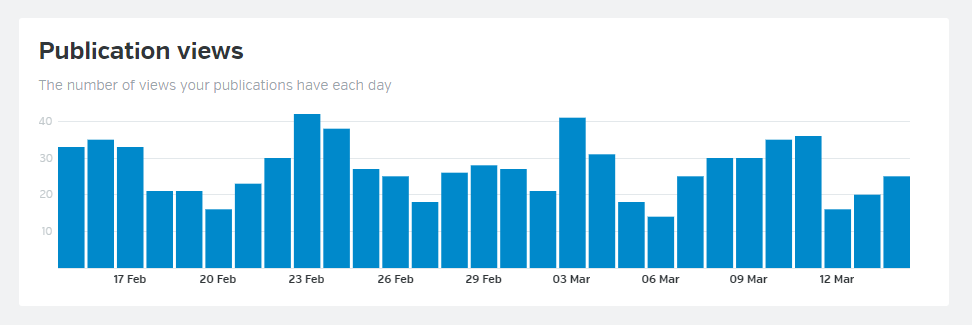
With Matomo, access comprehensive data on your visitors’ journey. You can track page views, time spent, clicks and much more. This information is essential for understanding which parts of your publications most captivate your readers, enabling you to adjust your content accordingly.
Customize tracking goals
Matomo’s integration with Calaméo lets you define tracking goals according to your needs: conversions, downloads or other specific actions. This flexibility helps you to precisely measure the performance of your documents and adapt your marketing strategies to maximize the impact of your publications.
Respect and protection of personal data
Matomo stands out for its commitment to data protection. Unlike other analytics solutions, Matomo gives you total control over your data, stored directly on your servers. This autonomy allows you to guarantee the confidentiality of your users, in full compliance with the RGPD, which is an asset for privacy-sensitive companies.
Optimizing your documents for an improved user experience
The information gathered by Matomo helps you improve the ergonomics and content of your publications. By understanding your readers’ preferences, you can adjust the layout, choose more relevant content, and create a smoother, more engaging reading experience.
Advanced audience segmentation
With the data segmentation offered by Matomo, you can analyze the behavior of different user groups. This segmentation enables you to better target your strategies and optimize audience engagement.
Conclusion: enjoy ethical, high-performance analytics for your Calaméo publications with Matomo
The integration of Matomo with Calaméo offers you a powerful solution for tracking, analyzing and optimizing the performance of your interactive publications. By choosing an analysis platform focused on data confidentiality and control, you strengthen the trust of your users while accessing essential information for your digital strategies. Embrace the Matomo integration today and turn every publication into an opportunity to improve your online impact.
Marketing content is one of your company’s most valuable assets—but only if people can actually find and use it.
Brochures, white papers, sales presentations, catalogs, and reports are often spread across cloud drives, emails, websites, product folders, and collaboration tools. As a result, teams spend valuable time searching for the right resources, sales representatives share outdated materials, and content quickly loses its value.
A Calaméo library widgetsolves this problem by bringing all your digital publications together in one organized, accessible space. Instead of managing disconnected files, you create a centralized content hub that’s easy to browse, share, and embed on your website.
Why marketing content becomes disorganized
Even companies with well-established marketing processes can struggle to keep their content organized. Several factors contribute to this challenge:
Content is stored across multiple platforms, from cloud storage and CRMs to intranets and email.
There’s no clear ownership of content management.
Multiple versions of the same document circulate throughout the organization.
Marketing, sales, and communications teams often work in separate silos.
Employees don’t have a single place to access the latest approved resources.
This lack of organization creates several problems:
Teams waste time looking for documents.
Outdated or incorrect materials are shared internally and externally.
Brand messaging becomes inconsistent.
Valuable content is underused instead of supporting marketing and sales efforts.
Turn your Calaméo library widget into a central content hub
A Calaméo library widget is much more than a collection of publications. When thoughtfully organized, it becomes a central hub for your marketing content.
Instead of simply storing documents, you create an environment where content is easy to discover, share, and reuse.
A well-organized library widget can:
Provide a single source for your marketing publications.
Help internal teams quickly find the resources they need.
Deliver a consistent brand experience across every touchpoint.
Support sales teams with ready-to-share content for prospects and customers.
Rather than functioning like another shared folder, your library widget becomes a strategic content resource for your entire organization.
How to structure your Calaméo library widget
The effectiveness of your library widget depends less on the number of publications it contains than on how they’re organized.
Organize by audience
One of the simplest ways to improve navigation is to group publications according to the people who use them.
For example:
Executive decision-makers
Marketing teams
Technical teams
Existing customers
Prospective customers
This approach allows every audience to quickly access the content that’s most relevant to their needs.
Organize by funnel stage
Another effective method is to organize publications according to the buyer’s journey.
Top of the Funnel (TOFU): Educational content, industry insights, trend reports, and guides.
Middle of the Funnel (MOFU): White papers, comparison guides, customer success stories, and case studies.
Bottom of the Funnel (BOFU): Product brochures, sales presentations, pricing information, and product documentation.
This structure helps marketing and sales teams work from the same content strategy while supporting prospects at every stage of the purchasing process.
Organize by product or service
If your company offers multiple products or services, organizing publications by offering is often the most intuitive solution.
For example:
Product documentation
Technical datasheets
Industry-specific use cases
Service presentations
Solution overviews
Sales teams can quickly locate the most relevant materials without searching through unrelated content.
Make your library widget easy to navigate
An organized library only delivers value if users can easily browse and share its content.
Here are a few best practices:
Use clear, descriptive publication titles instead of internal file names.
Organize publications with meaningful categories based on audience, product, or purpose.
Add concise descriptions that explain the value of each publication.
Regularly remove or replace outdated documents.
Highlight your most important publications so visitors find them first.
The easier your content is to access, the more likely people are to use it.
How different teams can benefit
A well-structured Calaméo library widget supports teams across your organization.
Marketing
Marketing teams can centralize campaign assets, repurpose existing publications, and maintain consistent messaging across every channel.
Sales
Sales representatives can quickly find the right brochures, presentations, and product information to share with prospects, making every customer conversation more effective.
Internal communications
Internal teams can distribute company updates, onboarding materials, HR resources, and training documents from one central location, ensuring everyone has access to the latest information.
Conclusion
Organizing your Calaméo library widget isn’t just about storing publications—it’s about building a smarter content management system.
By replacing scattered files with a centralized, well-structured library, you make your marketing content easier to discover, easier to share, and far more valuable for every team that relies on it.
When your content is organized, it doesn’t just become easier to find—it becomes easier to use.
In the digital age, virtual libraries have become essential tools for organizing, sharing and accessing online resources. Thanks to technological advances and new solutions such as the Library Widget from Calaméo, it’s easier than ever to create a virtual library that meets users’ modern needs. In this article, we’ll explore the key steps to creating your own virtual library and show you how to make the most of the tools available.
A virtual library is an organized collection of digital documents, accessible online. Unlike ordinary libraries, virtual libraries offer unlimited accessibility, simplified content management and the ability to adapt to the needs of their users.
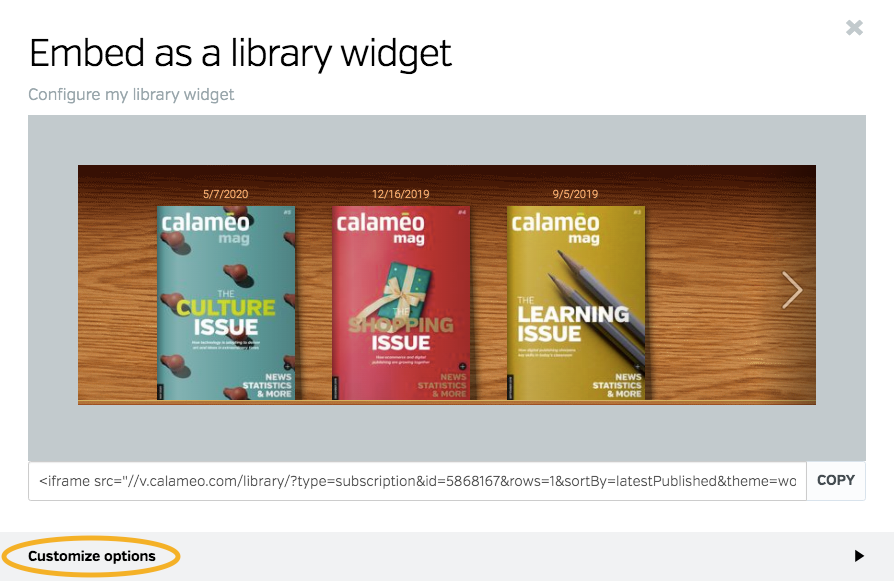
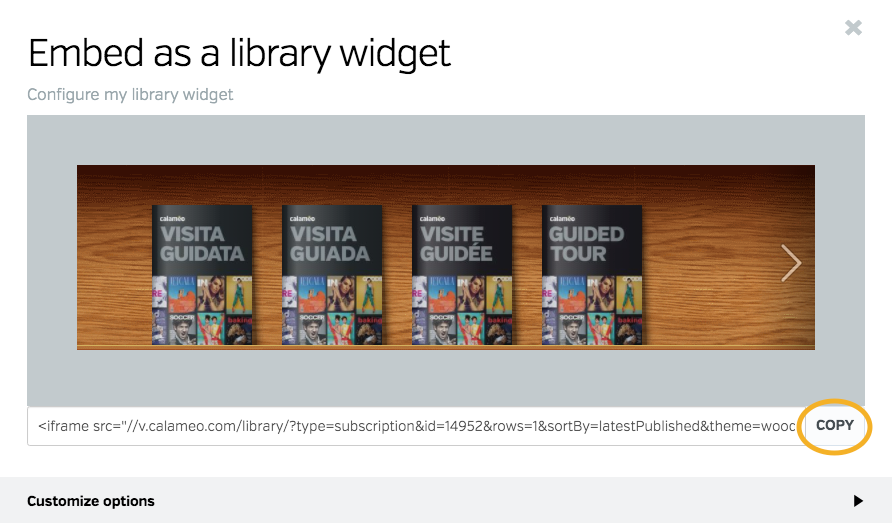
Here’s an example of a virtual library created with Calaméo:
Why you should create a virtual library: the major advantages
Optimized visual display
One of the greatest advantages of creating a virtual library is the simple, interactive way of showcasing your publications. Whether you want to display every issue of your magazine or a varied collection of documents, the virtual library enhances the visual impact of your content. Thanks to intuitive navigation, visitors can easily browse your virtual shelves and click on a cover to open the publication in full screen or in a new window. They can then easily return to your virtual library once they’ve finished reading.
Automatic updates
Automatic updates make it easy to manage your virtual library. Every time you add a new publication to your Library Folder on Calaméo, it instantly appears on your virtual shelves. By choosing to create a virtual library, you’re freed from repetitive manual management tasks. Removing publications is just as easy: mark them as private or move them to another Folder to adjust their accessibility with a few clicks.
In-depth analytics
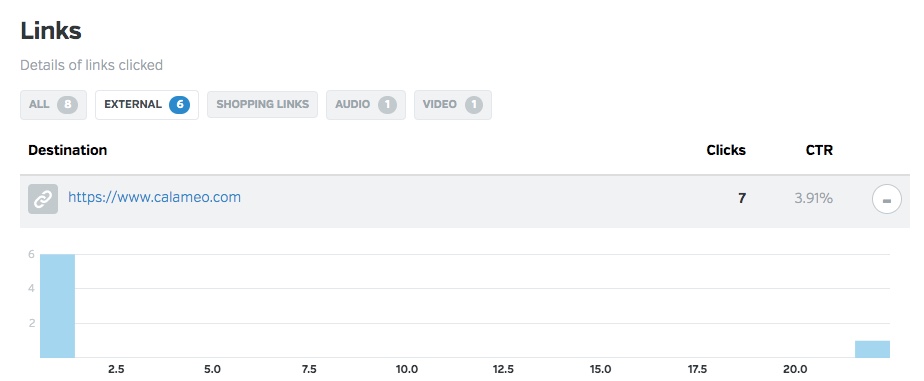
When you create a virtual library, you also benefit from detailed analytics on how your audience interacts with your publications. You can track views, link clicks, downloads and traffic origin. These analyses enable you to adapt your content to better meet your audience’s expectations and improve engagement with your virtual library.
Why choose Calaméo to create your virtual library?
To create an effective virtual library, it’s essential to choose a platform tailored to your needs. Several solutions are available on the market, but the Library Widget from Calaméo stands out for its ease of use, intuitive interface and numerous advanced features. This solution is ideal for those who want to create a virtual library quickly and without any particular technical skills.
By using this feature, you benefit from :
Easy embeding on your website: Calaméo enables effortless embeding of your virtual library on your website, which means you can showcase your digital resources in a harmonious, professional way.
Visual customization to match your brand: Thanks to a variety of customization options, you can adapt the appearance of your library to reflect your brand identity and blend seamlessly into the pages of your website.
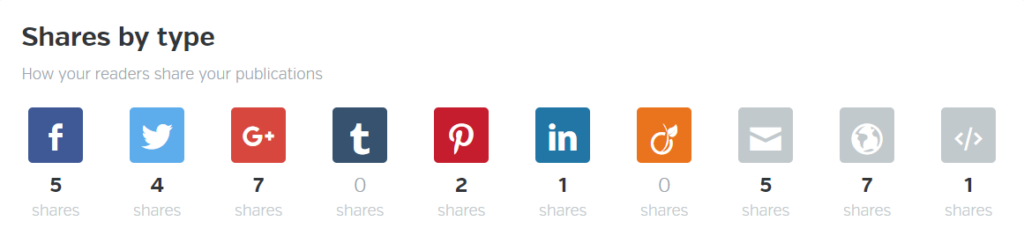
Numerous options for sharing and distributing your publications: With Calaméo, you can easily share your publications on social networks or by e-mail. This enables you to reach a wider audience and increase the visibility of your resources.
Step 1: Publish and organize your documents on Calaméo
Organizing your documents is a key step in ensuring an optimal user experience and smooth navigation in your virtual library. To ensure that your publications are easily accessible and well structured, it’s important to prepare them well before publishing them on Calaméo.
Start by publishing your digital documents on Calaméo. Each publication should be accompanied by a catchy, descriptive title, incorporating relevant keywords linked to your content. Don’t forget to fill in the description of each publication with clear, engaging summaries that will encourage users to discover your content.
Next, organize your publications by placing them in Folders or adding them to a Favorites list. For these documents to be visible in your virtual library, it is essential that Folders and publications are defined as public.
NOTE: Private publications will not be displayed in the Library Widget, giving you total control over what is visible to your users.
All you have to do is select the Folder (or favorites list) whose contents you wish to display in your virtual library. All public publications in this folder will automatically appear in your library, making it easy to manage your documents without any extra effort.
Step 2: Customize the appearance of your Library Widget
Personalizing your virtual library is essential to ensuring a user experience that reflects your brand identity. Thanks to the many customization options offered by the Calaméo Library Widget, you can adjust the appearance of your library so that it blends seamlessly with your website while reinforcing your brand image.
You can adjust the following elements of your Library Widget:
The texture or background color of the library to match the style of your website.
The number of shelves to display to visually organize your publications.
The size of your publication thumbnails for optimized display.
The information to be displayed for each publication (such as title or description).
The order in which your publications appear, allowing you to highlight certain strategic documents.
The way publications open (in a new window or full screen).
You can also adjust the appearance of thumbnails by choosing, for example, a shadow or other visual effects that enhance the impact of your publications. These subtle details play a key role in enhancing the aesthetics and navigation of your virtual library.
TIP: While you’re customizing the look and feel of your Calaméo Library Widget, you can see the changes in real time thanks to the preview function. This allows you to test different configurations and ensure that each modification fits perfectly into your overall site before finalizing the upload.
By customizing your virtual library with these options, you offer your users a fluid, visually appealing experience, while reinforcing your brand identity at every stage.
Step 3: Embed the Calaméo Library Widget into your website
Once you’ve carefully customized the look and feel of your virtual library, the next step is to embed it directly into your website. This step is crucial to making your virtual library accessible to your users and enabling smooth navigation between your content and the other pages of your site.
Embeding the Calaméo Library Widget is quick and easy, and you have several options for doing so. Once you’re happy with the configuration and design of your virtual library, simply copy the embed code provided by Calaméo. This code can be inserted on any page of your website, whether on a page dedicated to your publications or another section of your site.
This intuitive process makes it easy to present your digital document collections in a professional, interactive way.
READ MORE: If you need help with embedding, resources such as the tutorial or the support pagein the Calaméo Help Center are available to guide you step by step.
By embedding a Calaméo library on your site, you enable your visitors to easily explore your digital publications directly from your platform, without having to navigate to another site. This not only enhances the user experience, but also reinforces the consistency of your brand image by providing seamless access to your documents in a controlled environment.
Embeding requires no advanced technical skills and, once the code has been inserted, your virtual library will be automatically updated every time you publish new documents or modify existing ones. So you don’t have to worry about manually keeping your library up to date, which saves you and your team valuable time.
With just a few clicks, you can create a dynamic, scalable virtual library that blends seamlessly with your website, while enriching your users’ experience and facilitating access to your digital content.
Conclusion
Creating a virtual library represents a unique opportunity to modernize your content management and improve access to your digital resources. With the Calaméo Library Widget, you have a powerful and flexible tool at your disposal to set up a virtual library perfectly adapted to your needs.
Don’t wait any longer, transform the way you share information by starting to build your virtual library with Calaméo today!