Email marketing remains one of the most powerful tools for building customer loyalty and driving conversions.But to fully leverage your campaigns, your online publications—brochures, catalogs, white papers, or flipbooks—can become much more than simple informational assets. With Calaméo and its integrations with platforms such as MailerLite and Mailchimp, your content can turn into a strategic lever for lead generation, audience segmentation, and marketing automation.
Collect leads directly from your publications
Traditionally, email address collection relies on external forms or landing pages. With Calaméo, however, you can embed MailerLite or Mailchimp forms directly into your publications.
Concrete examples:
Product catalog: a subscription button placed after the presentation of your new products allows interested readers to join your mailing list in just one click.
Guide or white paper: an embedded form at the end of the document turns your content into an effective lead magnet.
Benefit: readers don’t need to leave your publication, reducing friction and significantly increasing sign-up rates.
All Calaméo publications generate valuable reader data: pages viewed, time spent on each page, links clicked, and more. This data can be used to segment your subscribers in MailerLite or Mailchimp.
How it works:
Create subscriber groups based on readers’ real interests.
Tailor your messages according to their interactions—for example, send specific offers to readers who viewed your premium catalog.
Prioritize communications based on engagement: the more a reader interacts with your publications, the more likely they are to receive targeted and personalized content.
Benefit: you send relevant campaigns to each segment, improving both user experience and conversion rates.
Automation and marketing workflows triggered by publications
With MailerLite and Mailchimp, your publications can trigger automated marketing workflows:
Welcome series: as soon as a reader signs up via an embedded form, they automatically receive your welcome emails.
Exclusive content delivery: share additional resources reserved for your most engaged subscribers.
Sales follow-ups: if a prospect views your catalog and signs up via an embedded form but doesn’t complete a purchase, an automated follow-up email can be sent.
Benefit: your publications become an active engine of your marketing strategy, saving time while maintaining personalized communication with your readers.
Performance analysis and campaign optimization
Integration with MailerLite and Mailchimp allows you to track the impact of your publications on your email campaigns: open rates, click-through rates, generated sign-ups, and more.
Practical applications:
Identify which publications attract the most new subscribers.
Determine which content is the most engaging and replicate its success.
Optimize your forms and messaging based on observed behavior to maximize conversions.
Benefit: your publications become powerful tools for continuous optimization of your email marketing strategy.
Conclusion: your publications become engagement drivers
With Calaméo, your brochures, catalogs, and flipbooks are no longer just informative assets. When integrated with MailerLite or Mailchimp, they become powerful tools to collect leads, segment audiences, automate campaigns, and analyze performance.
In short, every Calaméo publication can contribute to strengthening your email marketing strategy and turning reader engagement into tangible business results.
In the competitive world of real estate, every advantage can make the difference between a successful sale and a property that stays on the market. Calaméo is a digital publishing platform that can transform your static brochures into dynamic, persuasive sales tools and help you stand out from the competition. Find out now how to harness the full potential of Calaméo to boost your real estate sales.
Transform your brochures into powerful sales tools
Improve your brand image
First impressions count for a lot in real estate. With Calaméo, you can enhance your brand image. Create elegant, professional brochures that grab potential buyers’ attention at first glance. From high-resolution photos to detailed descriptions, every element is designed to reflect the quality and professionalism of your real estate agency.
Create demand
One of the keys to a successful real estate sale is to create a need among potential buyers. With Calaméo, you can highlight the unique features of each property in a captivating way. Use interactive features such as videos to bring each room to life and evoke emotion in prospects. More than just a brochure, your publication becomes an immersive experience that makes buyers want to take the plunge.
Organize your visits
Managing visits can be time-consuming and stressful, but with Calaméo, you can simplify the process. Incorporate interactive calendars using our Calendly integration into your brochures to make it easy for potential buyers to schedule visits. With online booking capabilities, you can avoid delays and scheduling conflicts, providing a seamless experience for your customers. By facilitating the visit planning process, you can accelerate the sales cycle and close deals faster.
Shift from static to interactive content and engage your audience
With Calaméo, you can go from traditional static content to interactive publications that captivate your audience and encourage engagement.
Add links
Links are powerful tools for directing your audience to additional relevant information. Include links to web pages, blog posts or even detailed property descriptions. By offering easy access to additional information, you demonstrate your expertise and commitment to your customers, which reinforces their trust in your agency.
Integrate videos
Nothing showcases a property better than immersive videos. Integrate virtual tour videos or testimonials from satisfied customers to bring your publications to life. Videos allow potential buyers to project themselves into the property and feel the unique atmosphere of each space. By adding videos to your Calaméo brochures, you create an immersive experience that captures attention and encourages conversions.
Locate properties
Location is a key factor in the real estate buying process. With Calaméo, you can add interactive maps using our Leaflet integration to show the precise location of each property. By providing information on surrounding neighborhoods, local amenities and public transport, you help potential buyers assess the suitability of each property in relation to their needs and preferences.
Increase your real estate sales
Collect leads
Calaméo also offers advanced lead generation features. Include contact forms directly in your brochures to make it easy for interested buyers to get in touch with you. By collecting the contact details of qualified prospects, you can nurture these leads throughout the buying process and convert them into satisfied customers.
Explore data
Finally, Calaméo offers you powerful tools for exploring and analyzing the data generated by your publications. Track readership statistics, link clicks and user interactions to understand what’s working and what can be improved. By using this information to refine your content strategy, you can maximize the impact of your publications and significantly increase your real estate sales.
Take action now
Our case study guides you beyond Calaméo’s native functionality, exploring integrations such as Leaflet, Shopify, JotformandTypeform. Expand your horizons by using this palette of tools for maximum personalization of your content. See our case study for a step-by-step guide to increasing your real estate sales with Calaméo. Don’t miss the opportunity to transform your content, engage your audience and increase your conversions.
Compared to printed material, digital communications have a lot of advantages. For one thing, they’re great if you want to go paperless. For another, it’s a lot easier to add a GIF to an online newsletter than to a piece of paper. But a truly revolutionary business advantage is the ability to track analytics for your digital publications.
Because analytics are so important, it can be intimidating to get started. If you’re wondering how to follow your Calaméo publications’ statistics, this is the guide for you! From the very basics to best practices, we’ll cover everything you need to know about analytics on Calaméo.
First of all, you might be wondering what exactly we mean by “analytics”. Although the word has been around a long time, it’s become much more popular since 2000. That’s because analytics specifically refers to examining and getting insights from data. Since the early 2000s, businesses have adopted digital technologies and enjoyed access to huge amounts of new data. Analytics help them understand and use that data.
As a result, analytics are increasingly important to all kinds of businesses. For Calaméo users, your online publications generate lots of great data. In this guide, we’ll show you how to find Calaméo analytics and the most valuable takeaways for your digital content.
How to use your Calaméo analytics
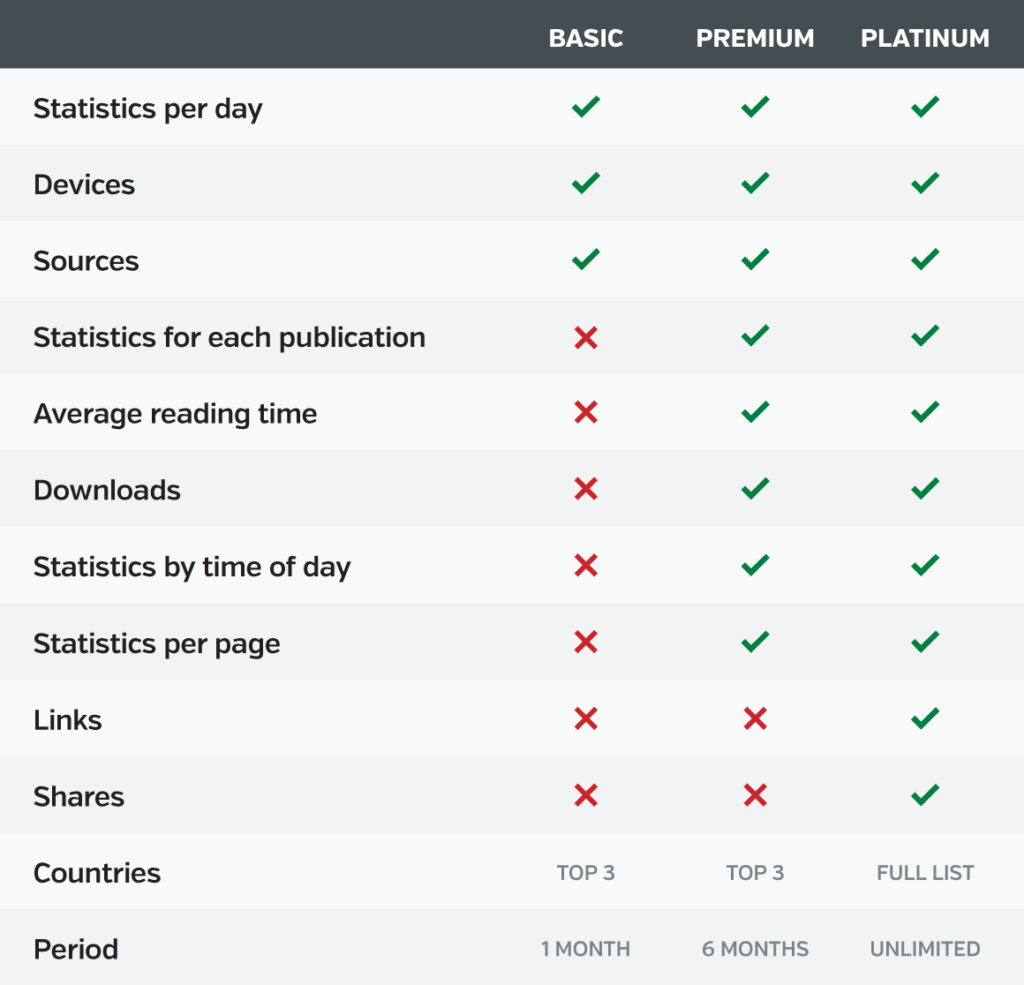
Good news: Viewership statistics are available for every Calaméo user. (Another reason why digital publishing on Calaméo is best in class!) However, the type of information that you can see will depend on whether your account is BASIC, PREMIUM or PLATINUM. Here’s a handy chart of available data for each plan:
Lifetime statistics
The easiest way to get to your publications’ analytics is by going to the Statistics tab in your Calaméo account. To start, make sure you are logged into your account. Next, display the top navigation bar. Click on the Statistics section.
In this section, you will find an overview of your account’s lifetime statistics. In other words, you can check the total number of views for all of your publications combined. Plus, you’ll see other interesting lifetime data in this section depending on your account type.
For all accounts, several features let you explore more about your publications’ viewership. Scroll down to:
Change the time period displayed
Drill down into key statistics like Clicks and Downloads
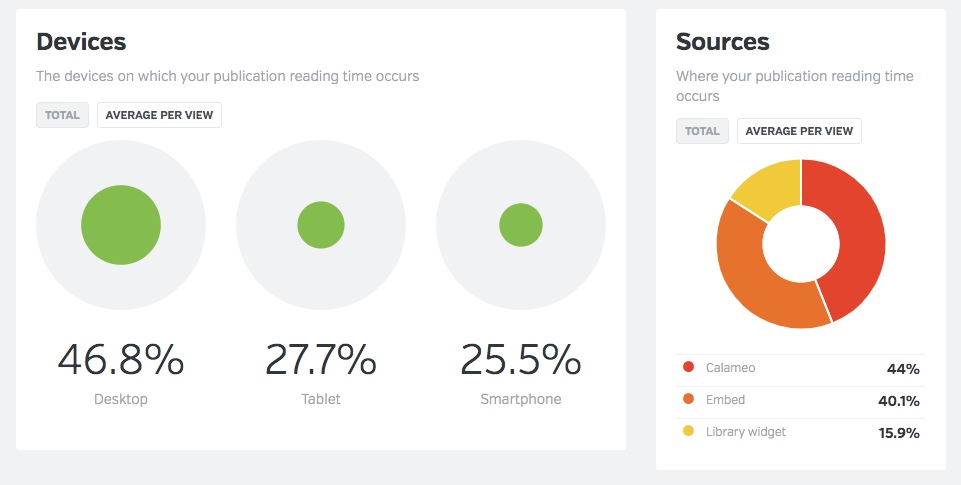
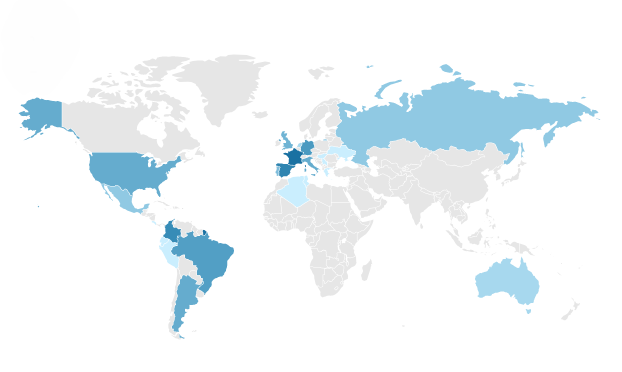
Discover other useful dimensions like Device, Source and Countries
Publication statistics
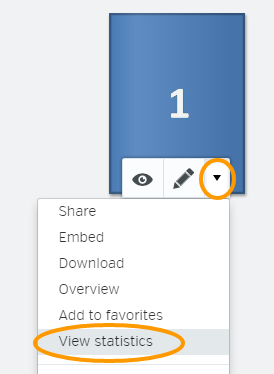
However, note that the Statistics tab provides info about all publications associated with your account. To track data for individual publications, you will need to go to the Publications tab of your account.
Find the publication you want to investigate and click the arrow. In the drop-down menu that opens, choose “View statistics”.
You can now explore the available data for just the selected publication.
Finally, PLATINUM users may connect their Calaméo accounts to Google Analytics. This powerful feature lets you integrate Calaméo data directly into your existing web analytics set-up.
💡 TIP: Want to see how using Calaméo with Google Analytics works for your business? Request your PLATINUM Demo today and test this exclusive feature for two weeks—absolutely free.
Identifying KPIs for your publications
After you’ve had a chance to explore your Calaméo statistics, it’s time to consider which analytics are the most important for your publications. Because the goal of analytics is to generate useful insights, deciding what information interests you is a major step. Or to put it another way, you’ll want to choose key performance indicators to follow.
Define business goals
To start, spend some time thinking about the main business goals associated with your online publications. Your specific goals will be unique, but here are a few common examples:
Growing awareness of your company, programs or services
Building a loyal audience for your brand and publications
Generating leads for your sales and marketing strategies
Increasing online revenue through your e-commerce operations
Different KPIs can help you measure progress on each one of these goals. For instance, publication views are a good indicator of awareness. On the other hand, the number of pages viewed and reading time better show your audience’s engagement. Download data may match how many leads came from a publication. And link clicks to your online store reveal what appeals to your shoppers.
Most of all, think about the information that matters to you. If you hope to expand your international reach, country data might be a top KPI to track.
Set KPIs and benchmarks
Select two to four KPIs for your publications, then gather the first set of data. This will give you a sense of where you are now in relation to your goals. Then, pick benchmarks for your KPIs to get a sense of where you want to be going. For example:
Awareness — 500 views / month
Leads — 25 downloads / month
International reach — 10% of views and downloads from Canada
Once you’ve finished identifying KPIs for your publications, take a look at our advice for ways to boost your results!
Tips to optimize performance
Since we began Calaméo all the way back in 2008, we’ve learned a thing or two about what works in digital publishing. Although there’s no guaranteed, easy trick for success, these simple tips are a good place to start.
Views
Beyond having great content, an unbeatable strategy for getting more views is to share your publications widely. Make it easy for your audience to discover your online publications! With Calaméo, you can:
Both of these analytics point to the level of engagement that viewers have with your publications. First, the number of page views tells you how much of your publication was opened per view. That is to say, did your audience view your publication past page one? Or all the way to the last page?
Next, reading time tells you how long audiences spent viewing your publication. Views with longer reading times and more page views suggest higher engagement than shorter reading times and fewer page views. And higher engagement means a bigger impact!
In recent years, offering content for download has become a key content marketing strategy. But even if you’re not focused on generating leads, direct downloads make for great user experience. When your audience gets to keep a copy of your publication, they can return to it anytime—even offline.
Here are a few effortless tips for boosting your results:
The click-through rate, or CTR, reveals how many viewers click the interactive links in your Calaméo publications. (More specifically, it calculates a percentage: the number of times a link was clicked divided by the number of times the relevant page was displayed.) Your advanced Calaméo statistics track the number of clicks and CTR for every link in your publications. Best of all? You can filter to focus on external, video, audio or Shopping links.
Although sharing to social media networks isn’t as big as it used to be, shares are still a good way to reach new audiences. That’s why our publication viewer includes a handy share button! But did you know that Calaméo’s PLATINUM statistics have detailed sharing data? See where, when and how your publications were shared from the viewer.
Now that you’ve gotten familiar with Calaméo’s analytics, chosen KPIs to track and optimized your publications, you can sit back and relax! To get started with analytics, most of the hard work happens at the beginning. However, there are a few important best practices to keep in mind for the future.
Be consistent.
Since you already know what information interests you, make sure you stay focused on consistent KPIs over time. Whether weekly, monthly or quarterly, collect the same stats on a regular schedule. Then, identify trends.
Be organized.
If you have access to limited statistics on Calaméo, you may wish to transfer your analytics to a separate document for tracking. Don’t misplace this data—analytics are especially useful to understand long-term trends.
Be flexible.
As time goes on, you might find that the KPIs you’re following are not connecting to your goals the way you expected. In that case, press pause and explore what isn’t working. You can rethink and adjust how you use analytics tools moving forward.
And there you have it—our complete guide to analytics on Calaméo! We hope you enjoy diving into insights and data about your digital publications. Have questions? You can write to us anytime at contact@calameo.com.


 Tip: add a trigger to display your form when the publication is opened or downloaded, for example. Discover MailerLite triggers and Mailchimp triggers.
 Discover all our professional features today by activating your 14-day free trial of Calaméo PLATINUM.