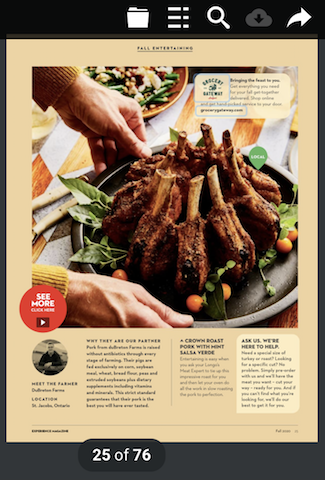
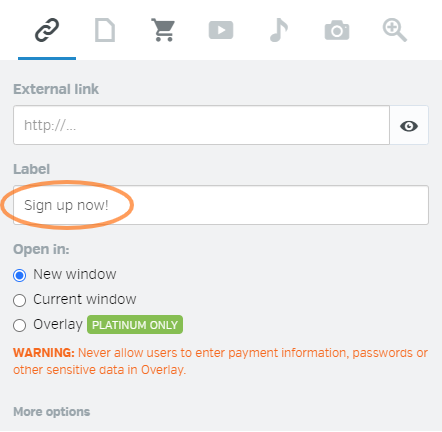
Looking to make your digital publications more dynamic and interactive? With Calaméo, you can capture your readers’ attention by adding animated links directly to your documents.
In this article, we introduce our new video tutorial: “How to add animated links to your publications.” This practical guide walks you through the feature step by step, helping you enhance the reading experience.
Why add animated links to a digital publication?
Digital publications are no longer just static documents. Today, they need to be engaging, lively, and intuitive.
Animated links allow you to:
Immediately draw the reader’s eye
Highlight key elements (CTAs, products, important sections)
Guide navigation more naturally
Strengthen overall interactivity
With Calaméo, these animations become a powerful way to transform your content into a more immersive experience.
A video tutorial to guide you
To help you get started, we’ve created a clear and easy-to-follow video tutorial.
Adding animated links to your Calaméo publications is a simple yet effective way to boost interactivity, modernize your design, and capture reader attention.
Subscribe to our YouTube channel for more tutorials and tips on digital publishing.
In 2025, content creators and businesses are looking for more efficient ways to publish and share their documents online. Calaméo is becoming an essential platform to transform your PDFs into interactive publications and maximize their impact. Here are the top reasons why you should start using it right now!
1. Provide an interactive experience for your audience
With Calaméo, your documents come to life with theintegration of videos, audio and interactive links. No more static PDFs: grab your readers’ attention and increase their engagement with immersive content.
2. Publish and share with ease
No technical skills required! Simply upload your document in seconds and get a shareable link or an embed code to add it directly to your website or social media.
3. Benefit from optimized search engine visibility
Calaméo publications are indexed by Google, giving your content a visibility boost. By adding relevant descriptions, you enhance your SEO and attract more readers.
4. Secure and control the distribution of your content
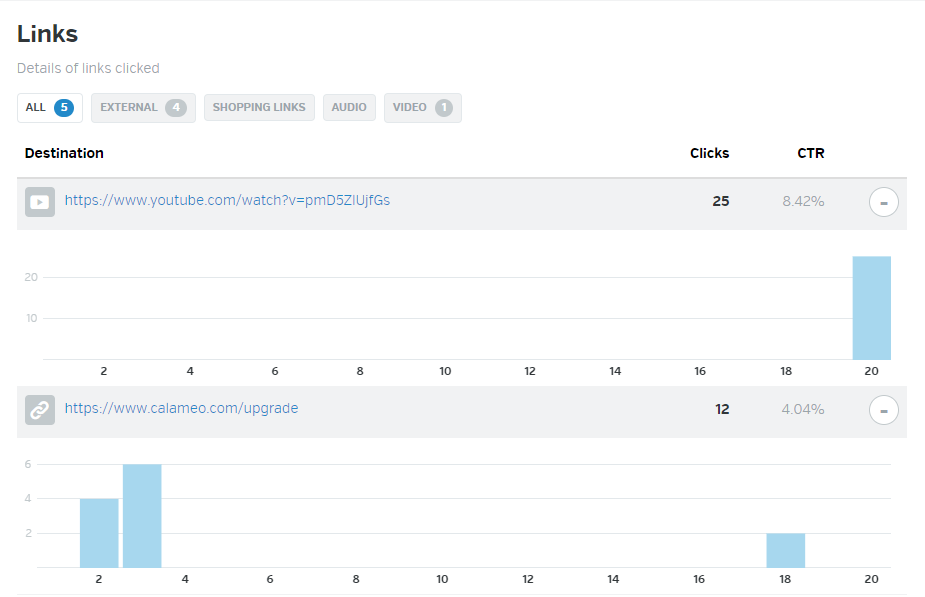
Thanks to advanced statistics, you can track views, reading duration, and audience engagement in real time. This data helps you refine your strategy and improve your future content.
Switch to interactive content with Calaméo!
In 2025, interactivity, simplicity, and performance are key to capturing your audience’s attention. Calaméo allows you to turn your documents into engaging experiences while maximizing their reach.
Looking to enhance your website or blog with interactive digital content? Calaméo makes it easy to embed your publications directly into your pages, providing your audience with a smooth and engaging reading experience.
In this article, we introduce our new video tutorial, “How to Embed Your Calaméo Publications on Your Blog or Website”, a step-by-step guide showing you how to use this essential feature and make the most of your digital content, no matter which CMS or web platform you use.
Why embed a Calaméo publication on your website or blog?
Embedding an interactive digital publication directly on your site is a great way to showcase your content and maximize its impact. With Calaméo, your documents are no longer just downloadable files—they become fully interactive assets integrated into your digital ecosystem.
Catalogs, magazines, brochures, reports, or presentations can be viewed directly on your website without any redirects. With Calaméo’s interactive features, such as links, videos, and smooth navigation, you can capture your visitors’ attention more effectively and enhance their overall experience.
This approach is ideal for businesses, institutions, content creators, and marketing professionals who want to deliver modern, accessible, and engaging content directly on their websites or blogs.
Benefits of embedding a Calaméo publication on your site
Embedding a Calaméo publication on your blog or website offers many advantages:
Visual enhancement: Your pages gain impact with elegant, interactive publications.
Improved user experience: Visitors can explore your content without leaving your site.
Interactivity and customization: Customize the reader’s appearance and add links, videos, or interactive elements.
Increased engagement: Longer time spent on your pages helps improve your analytics and performance metrics.
Universal compatibility: Embedding works across most websites and CMS platforms.
By embedding your publications directly into your pages, you boost the perceived value of your content while maintaining a professional and cohesive brand presentation.
A step-by-step video tutorial: How to embed your Calaméo publications
To guide you through the process, we’ve created a clear and accessible video tutorial that demonstrates how to embed your Calaméo publications on a blog or website, regardless of the platform you use.
In this video, you’ll learn:
Where to find the embed options in your Calaméo account
How to choose the right embed format for your site or blog
How to generate your embed code
How to insert the code into your pages or posts
Thanks to Calaméo’s intuitive interface, embedding is quick and requires no advanced technical skills.
Embedding your Calaméo publications on your blog or website is a simple and effective way to turn your documents into high-value, interactive content. In just a few steps, you can provide your audience with a modern, smooth, and engaging reading experience, fully integrated into your digital space.
Subscribe to our YouTube channel to discover more tutorials and tips on digital publishing.