Back to school is here, and the 10th issue of Calameo Magazine too!
Browse our brand new issue all about colors:
This issue is dedicated to colors. Whether you’re a painter, or a marketing enthusiast, there’ s something for everyone in this issue of Calaméo Magazine. We’ve got some interesting color stats, a spotlight on blue, tips on how to create your brand identity and a special Spotify playlist (and much more)!
💡TIP: Missed a previous issue? No worries! Check out the full archive and browse through each issue.
We hope you enjoy this issue of Calameo Magazine! Tell us on Twitter (@Calaméo) what you think, and stay tuned for the next issue.
In a world where visual information is just as important as text, giving your readers the ability to locate, explore, and immerse themselves directly from your publications has become a real advantage. With Calaméo, you can enhance your content by integrating interactive maps, making your publications more engaging and immersive.
Google Maps: simplified geolocation
With Google Maps integration, you can insert a map directly into your publications. Your readers immediately see the location without leaving your document. Whether you’re showcasing a store, an event, or a tourist site, a Google Map provides instant context at a glance.
Key benefit: Your readers stay focused on your content while accessing all the geographic information they need.
Google Street View: immerse your readers
To take immersion further, Calaméo allows you to add Google Street View. This feature offers a 360° view of any location, giving your readers the feeling of being there in person. Whether you’re presenting a campus, an exhibition hall, or a neighborhood, Street View adds an interactive and realistic dimension to your publication.
Tip: Use Street View to guide your readers through tours, virtual visits, or presentations of iconic locations.
Leaflet: fully customizable interactive maps
For even more dynamic publications, Leaflet lets you create fully customized interactive maps. You can add points of interest, routes, or specific areas to provide an enriched and intuitive geographic navigation. It’s perfect for travel guides, urban projects, or any content where mapping plays a central role.
Bonus: Your readers can interact with the map directly from the publication, turning passive reading into an active experience.
Why integrate maps into your publications?
Enhanced immersion: Your readers instantly visualize the location or route presented.
Improved user experience: No more switching back and forth to an external browser.
Valuable content: Your publications become more attractive and professional, strengthening the impact of your message.
With these tools, Calaméo doesn’t just share your content—it transforms it into a truly interactive experience. Whether you want to pinpoint a location, offer a virtual tour, or create custom maps, your publications have never been more alive.
Integrations are a feature reserved for our PLATINUM users.
Creating a professional digital publication shouldn’t take hours. With Calaméo, just a few minutes are enough to turn a simple PDF into an interactive and easy-to-share reading experience.
Here’s our quick guide to publishing your brochure in less than 10 minutes.
1. Prepare your PDF
Before publishing your document, make sure your file is ready to be viewed online:
pages in the correct order,
high-quality visuals,
text that is easy to read on mobile,
an optimized file size.
Whether it’s a business brochure, magazine, portfolio, guide, or catalog, every great digital publication starts with a well-prepared PDF.
2. Upload your document to Calaméo
Log in to your account and click on “Publish”.
Simply upload your PDF file: Calaméo automatically converts it into a digital flipbook publication.
In just a few moments, your document comes to life with a smooth interactive viewer accessible on desktop, tablet, and smartphone.
3. Customize your publication
Once your document is published, you can enhance the reading experience with several options:




 Key benefit: Your readers stay focused on your content while accessing all the geographic information they need.
 Tip: Use Street View to guide your readers through tours, virtual visits, or presentations of iconic locations.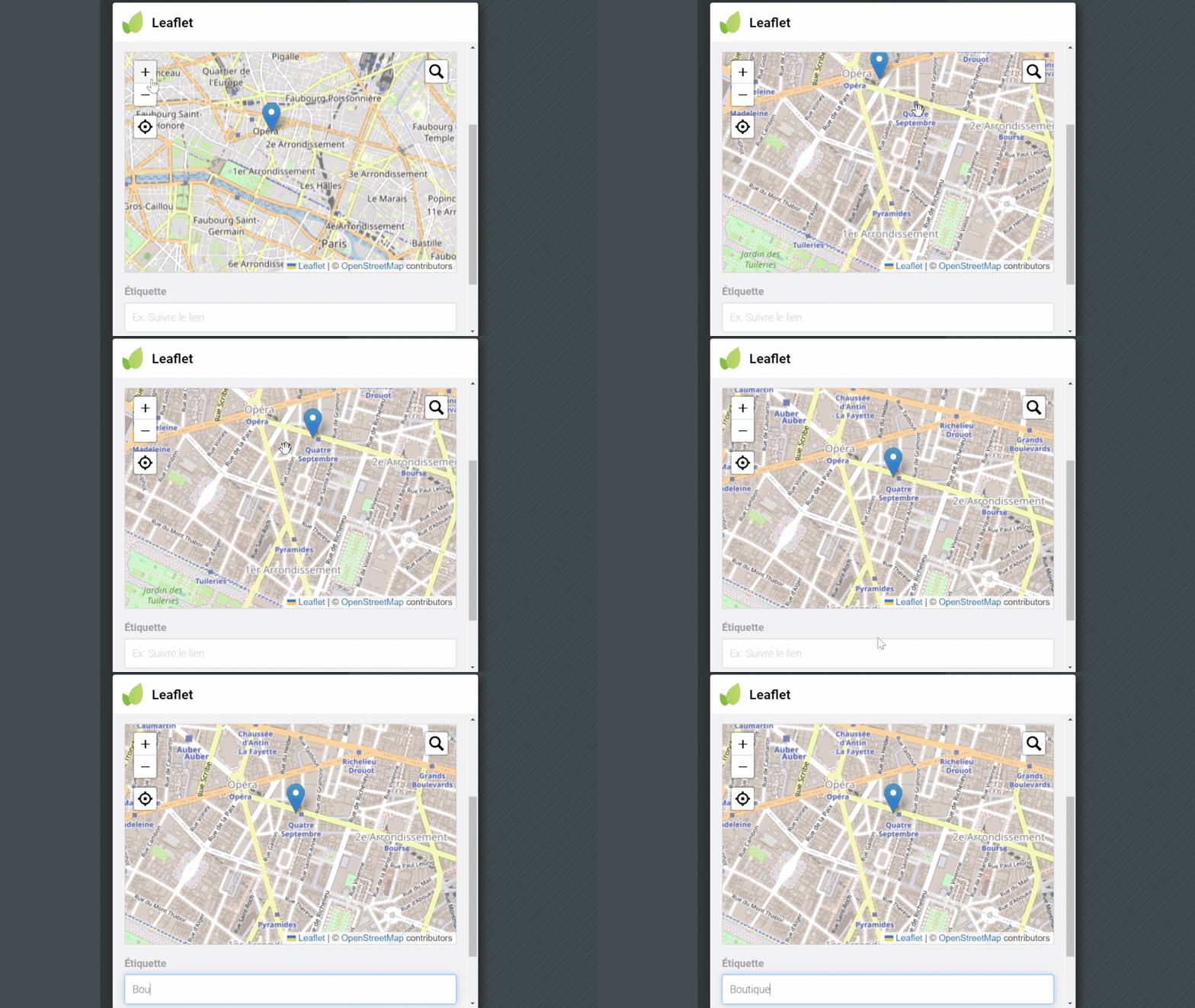
 Integrations are a feature reserved for our PLATINUM users.
 Start your
 Try
Try