An essential asset of digital publishing is the ability to offer your audience exclusive content. While private publications can help you keep internal documents confidential, they can also help you create a stronger relationship with your readers, clients and future customers.
In this article, learn about the benefits of exclusive content and tips for your publishing strategy on Calaméo.
BUILD YOUR BRAND
Certainly, your digital publications are a powerful tool for informing your audience. But don’t underestimate their power to enhance your brand, too. Limiting the availability of your content can concentrate the link with your brand. For instance, you may wish to keep your publications on Calaméo private. But you can still make them easy to browse on your own website with our embed feature for private publications.
In addition to convenient embeds, you can also take advantage of opportunities to enhance your exclusive content with interactive content and custom branding. As a result, your digital publications will be 100% you.
In recent years, focusing on subscriptions has been a strong trend in digital publishing and exclusivity is a key factor. By offering content that only subscribers can access, you can tempt casual readers to sign up, establish contacts and encourage your audience to keep returning.
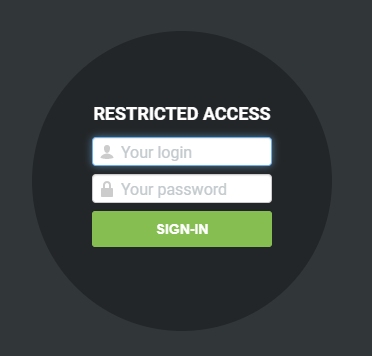
The flexible Subscribers feature provides a built-in solution for publishing subscribers-only content on Calaméo. First, secure exclusive publications behind a log-in window. Next, assign each subscriber a unique user name and password to use for access. In short, the first step to creating a great subscriber experience is exclusive content.
SUPPORT SALES
Personalization is already the next big thing in digital marketing. Recent studies have shown that when used well, it can help boost sales online. In fact, more than two-thirds of customers expect a personalized experience.
Those numbers are just one reason why you might want to consider tailoring your sales material to individual clients. Take a little time to customize your brochures, presentations and proposals. Then, publish on Calaméo and share with your prospects via private URL.
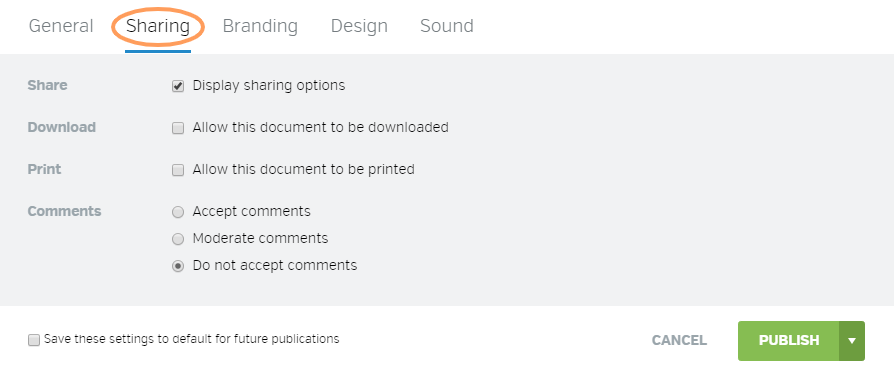
💡TIP: To generate a new private URL for your publication, open the share window and click on “Renew private URL.”
REWARD LOYALTY
Because everyone loves perks. And your audience is no exception! Investing in some exclusive, privately published bonus content will surprise and delight your most dedicated followers. For example, you might offer an extra magazine issue, sneak peek at upcoming events or flyer with special deals. Publishing on Calaméo ensures that your bonus content looks great in a fun format. Plus, direct downloads let fans enjoy it even offline.
No matter how you choose to publish exclusive content, measuring its performance should be part of your strategy. Calaméo’s advanced statistics contain valuable data to help you analyze the success of your private publications. For more details on where to start, check out our quick guide to digital publishing KPIs.
On Calaméo, you can publish and share up to 50 private publications—absolutely free. Get your free account and start creating exclusive content today.
Why publish an online magazine (instead of emailing a PDF)
Publishing an online magazine from a PDF isn’t just about “uploading a file” and sharing a link. If your goal is to grow an audience, boost visibility, and drive measurable actions (subscriptions, clicks, inquiries, sales), you need to treat your magazine like a real content asset.
A high-performing online magazine usually comes down to four pillars:
A clean embed on your website (to capture traffic, reinforce your brand, and improve SEO)
A multichannel distribution plan (website, email, social)
A solid mobile experience
Consistent analytics (UTMs + KPIs) so you can see what works and improve issue after issue
Publishing an online magazine means making editorial content accessible on any screen, easy to share, and measurable. The goal isn’t just display—it’s distribution (email/social/website), visibility (SEO), and analysis (engagement, sources, clicks).
Quick pre-publish checklist
Prep a landing page (SEO + context)
Plan distribution (website, email, social)
Add CTAs / links (subscribe, contact, offer)
Track (UTMs, KPIs, reporting)
Improve using the data (most-read sections)
Why choose Calaméo to publish an online magazine (from a PDF)
If you want to publish an online magazine that’s easy to read on mobile, easy to share, embeddable on your website, and measurable, Calaméo is a strong option. The goal isn’t just “put the PDF online”—it’s building a complete setup: reading experience + distribution + SEO + analytics.
Fast publishing, no technical headache
Calaméo lets you turn a PDF into a digital publication in just a few steps, without needing custom development. For a marketing or editorial team, that matters: you can publish new issues quickly, iterate, and keep a consistent release rhythm.
Publish directly from a PDF
A reading experience designed for the web
Easy updates and issue management for your team
A better reading experience (especially on mobile)
Most reading happens on smartphones now. Calaméo gives you a web-friendly experience compared to sending a PDF attachment: smoother navigation, better comfort, improved accessibility, and less friction.
Mobile-first reading (depending on your publication setup)
More intuitive navigation than a raw PDF (TOC/markers, depending on how you set it up)
To maximize SEO and keep control of your traffic, the best approach is to embed your magazine on your own domain—on an optimized “Issue” page. Calaméo supports that: you can share via link and/or embed the publication on a WordPress page, a landing page, or a “Magazine” hub page.
Website embedding (dedicated page) to reinforce your brand
A hub approach: issue page + archives + topic collections
Better alignment with your content strategy (SEO + conversion)
Distribution and privacy options that fit professional use cases
A magazine can be public (to acquire traffic) or restricted (subscribers, clients, internal). Depending on your needs, Calaméo lets you adjust how you share: open publication, link-based sharing, or more restricted access (based on your plan and settings).
Public distribution to grow reach
Controlled sharing when content is restricted
Alignment between goals (audience) and constraints (privacy)
Data-driven improvement, issue after issue
Publishing is just step one. What makes the difference is continuous optimization. With Calaméo, you can analyze publication performance and connect your distribution actions to measurable outcomes.
Performance tracking (views, engagement, clicks—depending on your plan)
Ability to structure tracking with UTMs (email, social, QR, partners)
Editorial optimization: see what truly grabs attention and what drives clicks
Built to drive actions (not just reading)
An online magazine can support business goals: subscriptions, contact requests, quote requests, traffic to key pages. Calaméo fits well here because it helps create a reading experience that pushes users toward useful next steps (landing pages, forms, product pages, etc.).
Links and CTAs placed where they matter (not only at the end)
Shorter path from reading to action (less friction)
Click measurement to improve CTR and conversion
Calaméo is a great fit if… – You publish issues regularly (magazine, journal, long-form newsletter) – You want to centralize distribution on a dedicated page (SEO + measurement) – You need something easy for a marketing/editorial team to run – You want to measure and optimize (sources, clicks, engagement) – You want a higher-quality experience than a PDF email attachment
How to plug it into your workflow (simple recommendation)
To get the most out of Calaméo with WordPress, a proven approach is:
Create an “Issue” page on your website (summary + table of contents + CTA)
Add the Calaméo publication (embed or a “Read” button)
Drive all channels to that page (email, social, QR)
Tag links with UTMs and track your KPIs
Reuse the same template for every issue (make it repeatable)
Step 1 — Prep your PDF for online reading
Check readability (and avoid “fake problems”)
A PDF can look perfect in print and still be hard to read on mobile. Before publishing, check:
font size (comfortable on screen)
contrast (text too light, busy backgrounds)
margins (content too close to edges)
consistency in headings and sections (mental navigation)
Reduce PDF weight without killing quality
File weight directly impacts the experience: heavier files load slower, and slow loads increase drop-off. Aim for a reasonable balance:
An online magazine isn’t just “for reading”—it should guide people. Plan for:
a clickable table of contents (if possible)
stable sections (so you can compare performance over time)
action zones: subscribe, explore an offer, contact, download
Step 2 — Choose the format: flipbook, scrolling, or hybrid
There’s no one “best format.” It depends on your audience and your goal.
Flipbook: magazine feel and navigation
A flipbook makes sense if you want to:
keep the page-flip experience
showcase layout and design
offer a print-like navigation feel
Scrolling: efficient, faster reading
A scrolling format (web-page style) works well if:
your content reads like an article
you want a more mobile-first experience
you want more indexable text around the content
Hybrid approach (often the most effective)
In practice, a strong strategy is to:
publish the magazine (flipbook/reader)
host it on a dedicated page with contextual text (summary, TOC, highlights, links)
turn key sections into SEO articles (excerpts) that link back to the full issue
Step 3 — Build one landing page per issue (the core of SEO)
A common mistake is sharing a magazine via a simple link without building a page on your own domain. The result: weak SEO visibility, less control over the reader journey, and fragmented measurement.
Recommended structure for an “Issue” page
Your page should stand on its own as real content. A simple, effective structure:
1) Clear title + promise
Example: “Magazine X — January 2026 Issue: trend A, feature B, interview C.”
2) Summary (5–8 lines)
Explain what readers will get, using the words your audience actually searches for (helps SEO and LLMs).
3) Table of contents (bullets work great)
Feature story: …
Interview: …
Picks/selection: …
Events/agenda: …
4) “Key takeaways” block (3–5 bullets)
Great for featured snippets and AI answers.
5) Primary CTA + secondary CTA
Primary: “Subscribe” / “Get the next issue” / “Explore the offer”
Secondary: “Download the print version” / “Contact the editorial team”
6) Embedded reader (or a “Read the magazine” button)
If you embed, leave enough space and make sure it’s responsive. If not, a clear “Read the magazine” button works well.
7) Links to archives and related content
Add:
“All issues”
“Topic collections”
“Related articles”
Simple, practical SEO wins
One dedicated page per issue (stable, descriptive URL)
What matters is consistency (same logic every issue).
Repeatable monthly reporting
top sources (+ trend)
top clicked links
best-performing sections/pages
2–3 recommendations for the next issue
Step 6 — Improve issue after issue (the optimization loop)
Your advantage compounds over time when you systematize:
repeat what performs (sections, angles, CTAs)
remove friction (mobile, speed, navigation)
build topic pages that recycle content (evergreen SEO)
turn top themes into long-form SEO articles (acquisition)
Common mistakes (and how to avoid them)
Publishing without a dedicated page
Without an issue page, you lose SEO, journey control, and conversion opportunities.
Sending the PDF as an email attachment
You lose tracking, update flexibility, and often the mobile experience.
Too many generic CTAs
Better: 1 primary CTA, 1 secondary, plus contextual CTAs in the right sections.
No UTM tracking
Without UTMs, you can’t reliably compare email vs social vs QR vs SEO.
Conclusion
A strong online magazine is a system: dedicated page + multichannel distribution + tracking + continuous improvement. Once that foundation is in place, every issue becomes a longer-lasting asset that shares better and drives measurable results.
CTA suggestion (edit as needed)
Button: “Publish your next issue”
Secondary button: “Set up clean tracking (UTM/GA4)”
FAQ
How do I publish a PDF as an online magazine with Calaméo?
Upload your PDF to Calaméo, publish it as an online magazine, then create an “Issue” page on your site (summary + TOC + CTA) that embeds the publication (or links to it). Add UTMs to your distribution links to measure what performs.
How do I embed a Calaméo magazine on WordPress?
Create (or open) your WordPress issue page, paste the Calaméo embed code/block, then check mobile rendering. Add text around it (summary, highlights, key topics) to improve the experience and strengthen SEO.
How do I get a Calaméo magazine to show up on Google?
Don’t rely on the embed alone. Publish each issue on a dedicated page with unique text (summary, topics, highlights), strong internal linking (“Magazine” hub, related articles), and solid mobile performance. That’s what helps Google understand and index the page.
Can I track Calaméo publication visits in GA4?
Yes. Use UTM-tagged links in emails, social posts, QR codes, and paid campaigns so GA4 can identify sources. Then combine that with publication stats to analyze engagement and outcomes.
What analytics can Calaméo track for a digital magazine?
In practice, you’ll want to track audience (views/readers), engagement (reading depth and time), and clicks (actions). With well-structured UTMs, you can connect performance to channels and campaigns (email, social, QR, ads). Calaméo can track things like:
Total views (overall volume)
Total downloads (strong intent signal)
Total pages viewed (reading depth)
Average reading time (retention/quality)
Total clicks (interaction on links)
Shares, favorites, comments (engagement/virality)
Device breakdown (desktop/mobile/tablet)
Reader location (geography)
Views by hour (timing insights)
And with GA4 properly set up, you can go further by:
Getting more realistic unique-user views
Analyzing the full journey (before/during/after reading)
Is it better to email a PDF attachment or share a Calaméo link?
Share a link. It’s easier on mobile, easier to update, and much easier to track. Attachments make measurement harder and often degrade the reading experience.
Flipbook or scrolling PDF: what works best for an online magazine?
Flipbooks preserve the “magazine” feel and highlight layout. Scrolling is more direct and often more mobile-first. The most effective setup is often hybrid: an SEO-optimized issue page plus the embedded (or linked) Calaméo publication.
Have you ever seen an advertisement and immediately known which company it belonged to, even if you didn’t glimpse the name? Chances are you recognized certain facets of that company: special fonts, taglines, logos, and color combinations that belong unmistakably to a brand. These elements, and more, make up a brand’s identity. All visual and editorial aspects of a brand’s identity are determined by the brand’s style guide.
On the Calaméo blog we have talked about logos, brand identity and brand image. Next up? Brand style guides, sometimes called graphic charters or brand guidelines. In this article we will discuss the ins and outs of this important document, so let’s dive in!
First thing’s first: what is a brand style guide? A brand style guide is a document that governs all the visual (and sometimes editorial) elements of a company that make it recognizable and unique. It also explains when and how to use these elements. Simply put, a style guide is the key to all communications!
These guides ensure that there is no confusion when it comes to what the brand’s content should look and sound like. Using the guide as a reference, all company communications are consistent across channels and mediums. The style guide can be as detailed as you like; typically, larger companies have more comprehensive style guides because they are more likely to use a wider range of communication channels, and they appear in more places (television, print, online, etc.).
Who creates the style guide?
The creation of brand style guides is best left to professionals. However, it’s a collaborative process: graphic designers or design firms will work with you to create a style guide that suits your company and fits your brand identity. You must decide who you are, your values, and the image you’d like to portray to the world.
Why and how should you use a style guide?
A brand style guide is essential for your company’s brand identity. In order to maintain clear and cohesive communications across all channels, a style guide is the ultimate reference. Internal documents such as slide decks and employee newsletters, external communications such as advertisements or social media posts, plus everything in between: all of this content must look similar and adhere to your brand identity. To achieve this consistency, companies must have a brand style guide. Otherwise, logos may appear in the wrong colors and dimensions, there won’t be a uniform look to your communications, and your tone will be all over the place. Any communication that comes from the company, both internally and externally, should use the style guide as a reference.
What is included in a style guide?
Length and details may vary depending on the company, but a brand style guide is usually made up of the following visual and editorial elements:
Logo
Logos are a crucial part of a brand’s identity, its most visible identifier. Logos are images, texts, or shapes (or a combination of the three) in the company’s color palette that represent the company. A blue bird invokes Twitter, three stripes on a sneaker will certainly mean that they are Adidas, and a swoosh (both the shape and the word) is emblematic of Nike.
A company’s logo cannot be used haphazardly. The brand style guide should explicitly outline the exact colors and dimensions of the logo. Even the background on which the logo appears is specified in the style guide.
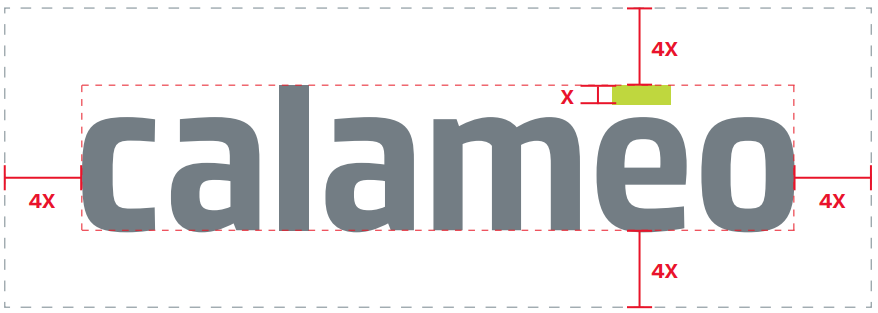
Take Calaméo’s logo, for example. The spacing and colors are exact: the dimensions around the lettering are determined by the height of the green accent, and the colors are specific to our brand.
There are other elements to consider. Do you have a slogan or motto with words as part of your logo? If so, you must clearly state where the slogan goes, how big it can be, the color(s) to use, and when to employ this version of the logo. There are many rules you must define in your brand style guide, especially when it comes to your logo.
Colors
Companies have specific brand colors, usually two to three, that they use in logos and branding. The style guide will include complementary colors as well. These colors all together are known as the company’s color palette.
Great thought and care go into a company’s color palette. There are even psychological tricks behind choosing certain colors that the company wants associated with the brand or product. They may want to demonstrate trust, youth, sophistication, or other descriptors.
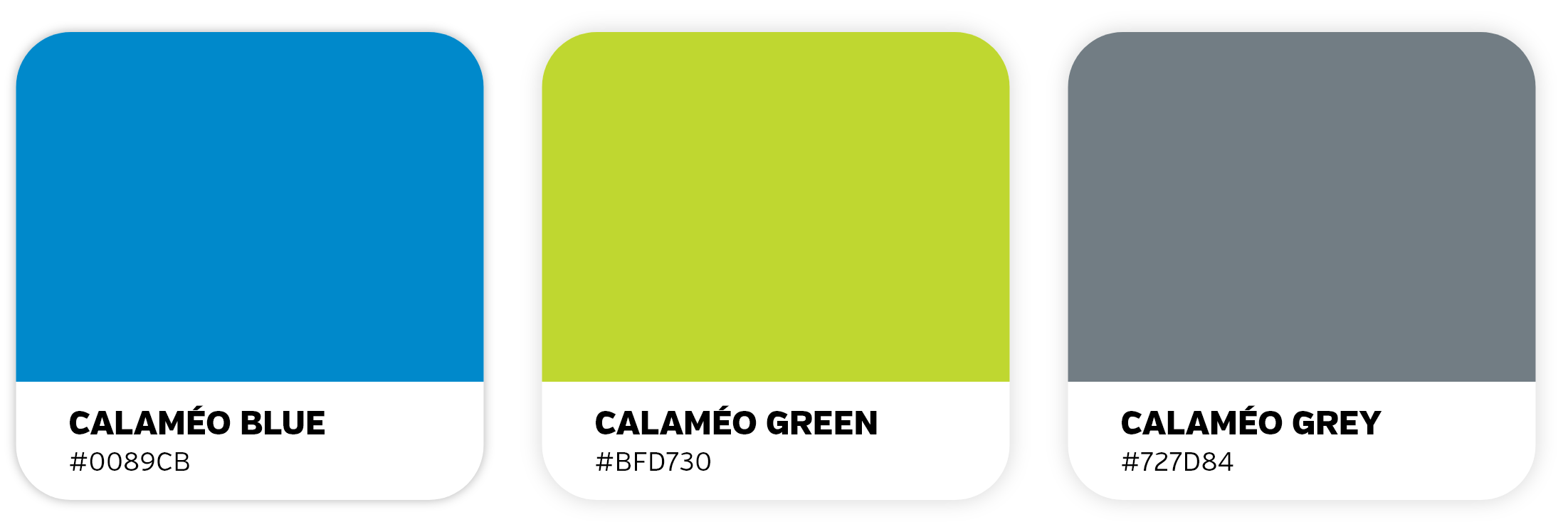
The brand style guide should outline all the ways to find these colors: a visual representation of the color, HEX and RGB formats, and other formats if necessary. Rather than just “blue” or “red”, companies choose very specific shades of these colors that go well together and set them apart from other brands. These exact shades need to be used every time.
Examples of Calaméo’s color palette using the HEX values
Typeface
Another important element of the brand style guide is typeface. Typeface is the kind of lettering used in communications, which includes fonts. Does your company use only lowercase letters? All capitals? You must include the size, spacing, and color of your typeface in your style guide so employees know exactly how the typeface should look.
Work with a graphic designer to choose the best typeface for your company. Some brands even create their own fonts! Keep in mind that your typeface also reflects your tone– is it silly, serious, elevated? Your typeface must work well with the other elements of your style guide.
Images
Some brand style guidelines include rules about styles of images or photographs to use. These images must fit into the brand’s identity and remain consistent; you should not use a bright and airy photograph one day and then a dark and moody photograph the next. The rules could include using colors from the company’s color palette or desired emotions that the images should evoke (energetic, powerful, soothing). Images are available to download on sites like Getty Images, Shutterstock, or Unsplash, if your company does not have access to a photographer or photography studio to create your own images. However, make sure to check that you have the right to use the images.
Icons
Brand style guides may also include illustrations or icons. Consider the icons you see on a company’s website: a shopping cart to click on when you are ready to purchase or an envelope icon if you want to communicate with the company via email. These icons must be coherent across all platforms. Icons will, much like the rest of the elements of the style guide, reflect the brand identity. Whimsical, rigid, colorful, playful…your icons can express a lot about your brand!
A few of Calaméo’s icons
Tone
Your tone and voice give your brand a personality via the written word. Once you decide who you are, it should be easy to find your company’s tone The brand style guide may include different instructions depending on the channel– perhaps your social media tone will be slightly less formal than that of your advertisements, for example. The guide should include written examples so employees can see how to employ the tone in different situations. Think of the image you want to project, and stay consistent.
Applying your style guide to digital publications
So now that you know all about style guides, it’s time to apply this knowledge to your digital publications! Because digital publishing is a visual medium, consistent brand visuals make all the difference between an amateur-looking document and a professional-grade publication.
With Calaméo, you can personalize your viewer Theme, add your logo, and enrich your content yourself so that your digital publications match your brand identity. With our White Label feature for PLATINUM members, your publications appear in your name and image, without the Calaméo logo. Start your free trial today!