We’ve got a big announcement to finish out the year on Calaméo. In just a few weeks, we’ll be unveiling an all-new publication viewer.
The new “2021” theme will offer a fully updated and improved viewer. Based on our classic “Default” option, “2021” has been reimagined with a streamlined design and modern feel.
But we’ve made great UX top priority in the new theme. You’ll find a viewer that’s easy and intuitive to use, as well as perfect for displaying your documents.
Ready to discover the “2021” theme for your publications on Calaméo? We’ll be rolling out the new viewer to all of our users soon. Watch this space for complete details!
Adding interactive links to a digital publication can quickly become a long and repetitive task. Identifying each URL, creating the interaction, making sure no link has been forgotten… when pages start to add up, the time spent increases quickly.
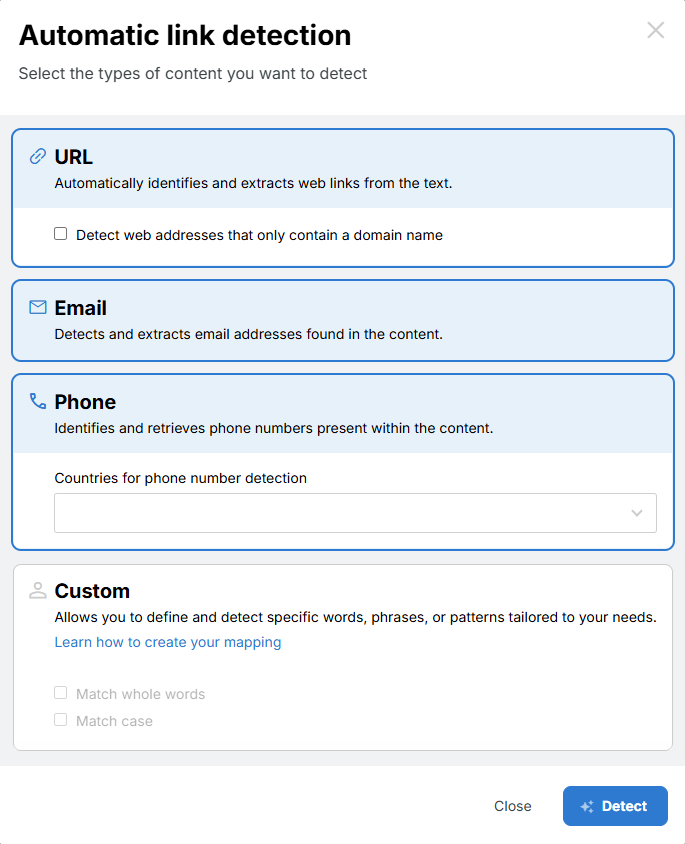
To simplify your workflow, a new feature is now available in the Calaméo Editor: automatic link detection, available for all PLATINUM users.
The goal is simple: turn your URLs into clickable links with minimal effort and in just a few clicks.
Simplified link management
In the Calaméo Editor, a single button allows you to launch automatic detection of the links present in your text.
Simply:
Click the button
The Editor identifies all URLs in your publication’s text
Turn them into interactive links in just one click
No more adding each link manually. No more double-checking to make sure nothing was missed.
Links play a key role in the performance of your content. They allow you to:
Redirect readers to your website
Highlight products or services
Share additional resources
Generate traffic and conversions
However, the richer your publications are, the more links you need to manage — and the more time-consuming the process becomes.
Thanks to automatic detection, you can avoid missed links, reduce repetitive actions, and speed up your workflow. The time you save can then be spent on what really matters: your strategy, your content, and your performance.
A feature designed for efficiency
Easy to use and fully integrated into the Editor, this new feature reflects our commitment to providing PLATINUM users with ever more powerful and seamless tools.
Great news! With the Calaméo Library Widget, you can create a sleek, fully integrated digital library on your website in just a few clicks.
In this article, discover our video tutorial “How to Create your Calaméo Library Widget” — a simple and comprehensive guide to help you set up your publication space on your site.
Why create a Calaméothèque?
The Calaméo Library Widget is a powerful tool for organizing, presenting, and showcasing your online publications. Whether you manage a collection of magazines, a set of reports, or various brochures, it allows you to offer your audience clear, professional, and immersive access to your content.
The concrete benefits:
Centralize all your publications: Group your documents in one place to offer a smooth and consistent reading experience.
Make access easier for your audience: No more sharing links one by one: your Calaméo Library becomes the single entry point to all your content.
Enhance your brand image: The Calaméo Library integrates directly into your website, giving your publications an elegant and professional presentation.
Save time managing your content: Add, remove, or update your publications in just seconds — without touching your website.
A step-by-step video tutorial
Creating a Calaméo Library is both quick and customizable. Our video tutorial “How to Create your Calaméo Library Widget” walks you through each step:
accessing the feature from your Calaméo account,
selecting the publications you want to display,
customizing the look and feel of your library,
embedding the code on your website in just a few seconds.
(Subtitles are available in 7 languages.)
Conclusion
The Calaméo Library Widget is a simple, efficient, and professional way to showcase your publications directly on your website. Whether you’re a business, an association, an institution, or a content creator, this feature helps you offer your audience a clear, enjoyable, and beautifully integrated reading experience!


 Learn more:
  Available now for all
