Adding interactive links to a digital publication can quickly become a long and repetitive task. Identifying each URL, creating the interaction, making sure no link has been forgotten… when pages start to add up, the time spent increases quickly.
To simplify your workflow, a new feature is now available in the Calaméo Editor: automatic link detection, available for all PLATINUM users.
The goal is simple: turn your URLs into clickable links with minimal effort and in just a few clicks.
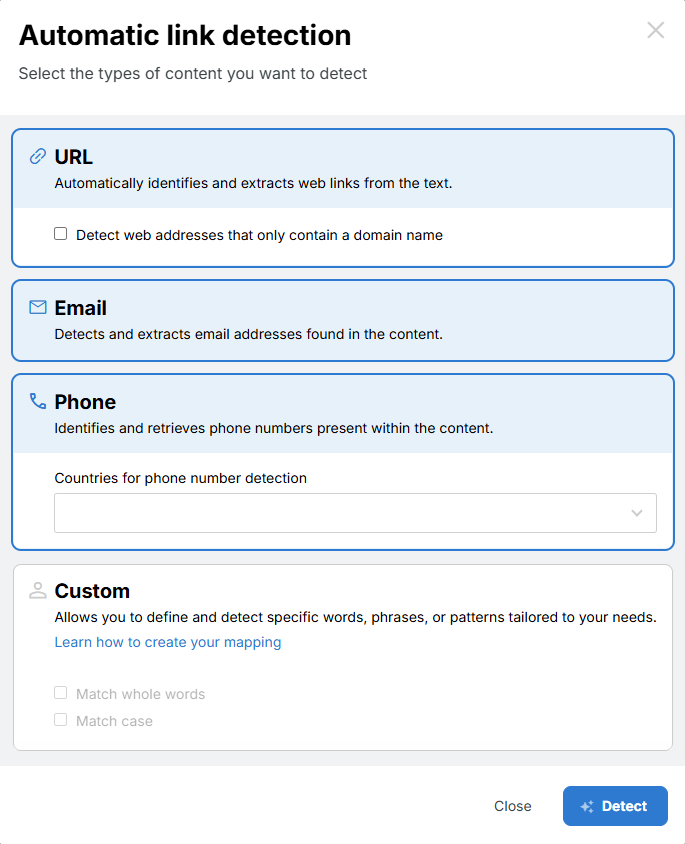
Simplified link management
In the Calaméo Editor, a single button allows you to launch automatic detection of the links present in your text.
Simply:
Click the button
The Editor identifies all URLs in your publication’s text
Turn them into interactive links in just one click
No more adding each link manually. No more double-checking to make sure nothing was missed.
Links play a key role in the performance of your content. They allow you to:
Redirect readers to your website
Highlight products or services
Share additional resources
Generate traffic and conversions
However, the richer your publications are, the more links you need to manage — and the more time-consuming the process becomes.
Thanks to automatic detection, you can avoid missed links, reduce repetitive actions, and speed up your workflow. The time you save can then be spent on what really matters: your strategy, your content, and your performance.
A feature designed for efficiency
Easy to use and fully integrated into the Editor, this new feature reflects our commitment to providing PLATINUM users with ever more powerful and seamless tools.
In the competitive world of real estate, every advantage can make the difference between a successful sale and a property that stays on the market. Calaméo is a digital publishing platform that can transform your static brochures into dynamic, persuasive sales tools and help you stand out from the competition. Find out now how to harness the full potential of Calaméo to boost your real estate sales.
Transform your brochures into powerful sales tools
Improve your brand image
First impressions count for a lot in real estate. With Calaméo, you can enhance your brand image. Create elegant, professional brochures that grab potential buyers’ attention at first glance. From high-resolution photos to detailed descriptions, every element is designed to reflect the quality and professionalism of your real estate agency.
Create demand
One of the keys to a successful real estate sale is to create a need among potential buyers. With Calaméo, you can highlight the unique features of each property in a captivating way. Use interactive features such as videos to bring each room to life and evoke emotion in prospects. More than just a brochure, your publication becomes an immersive experience that makes buyers want to take the plunge.
Organize your visits
Managing visits can be time-consuming and stressful, but with Calaméo, you can simplify the process. Incorporate interactive calendars using our Calendly integration into your brochures to make it easy for potential buyers to schedule visits. With online booking capabilities, you can avoid delays and scheduling conflicts, providing a seamless experience for your customers. By facilitating the visit planning process, you can accelerate the sales cycle and close deals faster.
Shift from static to interactive content and engage your audience
With Calaméo, you can go from traditional static content to interactive publications that captivate your audience and encourage engagement.
Add links
Links are powerful tools for directing your audience to additional relevant information. Include links to web pages, blog posts or even detailed property descriptions. By offering easy access to additional information, you demonstrate your expertise and commitment to your customers, which reinforces their trust in your agency.
Integrate videos
Nothing showcases a property better than immersive videos. Integrate virtual tour videos or testimonials from satisfied customers to bring your publications to life. Videos allow potential buyers to project themselves into the property and feel the unique atmosphere of each space. By adding videos to your Calaméo brochures, you create an immersive experience that captures attention and encourages conversions.
Locate properties
Location is a key factor in the real estate buying process. With Calaméo, you can add interactive maps using our Leaflet integration to show the precise location of each property. By providing information on surrounding neighborhoods, local amenities and public transport, you help potential buyers assess the suitability of each property in relation to their needs and preferences.
Increase your real estate sales
Collect leads
Calaméo also offers advanced lead generation features. Include contact forms directly in your brochures to make it easy for interested buyers to get in touch with you. By collecting the contact details of qualified prospects, you can nurture these leads throughout the buying process and convert them into satisfied customers.
Explore data
Finally, Calaméo offers you powerful tools for exploring and analyzing the data generated by your publications. Track readership statistics, link clicks and user interactions to understand what’s working and what can be improved. By using this information to refine your content strategy, you can maximize the impact of your publications and significantly increase your real estate sales.
Take action now
Our case study guides you beyond Calaméo’s native functionality, exploring integrations such as Leaflet, Shopify, JotformandTypeform. Expand your horizons by using this palette of tools for maximum personalization of your content. See our case study for a step-by-step guide to increasing your real estate sales with Calaméo. Don’t miss the opportunity to transform your content, engage your audience and increase your conversions.
Marketing content is one of your company’s most valuable assets—but only if people can actually find and use it.
Brochures, white papers, sales presentations, catalogs, and reports are often spread across cloud drives, emails, websites, product folders, and collaboration tools. As a result, teams spend valuable time searching for the right resources, sales representatives share outdated materials, and content quickly loses its value.
A Calaméo library widgetsolves this problem by bringing all your digital publications together in one organized, accessible space. Instead of managing disconnected files, you create a centralized content hub that’s easy to browse, share, and embed on your website.
Why marketing content becomes disorganized
Even companies with well-established marketing processes can struggle to keep their content organized. Several factors contribute to this challenge:
Content is stored across multiple platforms, from cloud storage and CRMs to intranets and email.
There’s no clear ownership of content management.
Multiple versions of the same document circulate throughout the organization.
Marketing, sales, and communications teams often work in separate silos.
Employees don’t have a single place to access the latest approved resources.
This lack of organization creates several problems:
Teams waste time looking for documents.
Outdated or incorrect materials are shared internally and externally.
Brand messaging becomes inconsistent.
Valuable content is underused instead of supporting marketing and sales efforts.
Turn your Calaméo library widget into a central content hub
A Calaméo library widget is much more than a collection of publications. When thoughtfully organized, it becomes a central hub for your marketing content.
Instead of simply storing documents, you create an environment where content is easy to discover, share, and reuse.
A well-organized library widget can:
Provide a single source for your marketing publications.
Help internal teams quickly find the resources they need.
Deliver a consistent brand experience across every touchpoint.
Support sales teams with ready-to-share content for prospects and customers.
Rather than functioning like another shared folder, your library widget becomes a strategic content resource for your entire organization.
How to structure your Calaméo library widget
The effectiveness of your library widget depends less on the number of publications it contains than on how they’re organized.
Organize by audience
One of the simplest ways to improve navigation is to group publications according to the people who use them.
For example:
Executive decision-makers
Marketing teams
Technical teams
Existing customers
Prospective customers
This approach allows every audience to quickly access the content that’s most relevant to their needs.
Organize by funnel stage
Another effective method is to organize publications according to the buyer’s journey.
Top of the Funnel (TOFU): Educational content, industry insights, trend reports, and guides.
Middle of the Funnel (MOFU): White papers, comparison guides, customer success stories, and case studies.
Bottom of the Funnel (BOFU): Product brochures, sales presentations, pricing information, and product documentation.
This structure helps marketing and sales teams work from the same content strategy while supporting prospects at every stage of the purchasing process.
Organize by product or service
If your company offers multiple products or services, organizing publications by offering is often the most intuitive solution.
For example:
Product documentation
Technical datasheets
Industry-specific use cases
Service presentations
Solution overviews
Sales teams can quickly locate the most relevant materials without searching through unrelated content.
Make your library widget easy to navigate
An organized library only delivers value if users can easily browse and share its content.
Here are a few best practices:
Use clear, descriptive publication titles instead of internal file names.
Organize publications with meaningful categories based on audience, product, or purpose.
Add concise descriptions that explain the value of each publication.
Regularly remove or replace outdated documents.
Highlight your most important publications so visitors find them first.
The easier your content is to access, the more likely people are to use it.
How different teams can benefit
A well-structured Calaméo library widget supports teams across your organization.
Marketing
Marketing teams can centralize campaign assets, repurpose existing publications, and maintain consistent messaging across every channel.
Sales
Sales representatives can quickly find the right brochures, presentations, and product information to share with prospects, making every customer conversation more effective.
Internal communications
Internal teams can distribute company updates, onboarding materials, HR resources, and training documents from one central location, ensuring everyone has access to the latest information.
Conclusion
Organizing your Calaméo library widget isn’t just about storing publications—it’s about building a smarter content management system.
By replacing scattered files with a centralized, well-structured library, you make your marketing content easier to discover, easier to share, and far more valuable for every team that relies on it.
When your content is organized, it doesn’t just become easier to find—it becomes easier to use.