Digital publishing is a great way for companies to communicate with their target audience. However, the internet is saturated with brand-created content, and it can be difficult to stand out and reach your desired audience. In this article, we’ll share three tips to improve your digital publications and help you attract more readers.
1. Create interesting and engaging content
Content is king, and that applies to digital publications as well. If you want to get your audience’s attention, you need to create interesting and engaging content. That means it should be informative, useful and entertaining. Be sure to use simple, easy-to-understand language so that your audience can follow your message. Also, don’t hesitate to use images and videos to make your content more engaging and easy to digest.
It is important to note that the quality of your content is crucial to attract readers. Indeed, if your content is not relevant or interesting, readers will not stay on your digital publication and will not come back to read your other content. So take the time to do your research and write quality content that meets the needs of your target audience.
2. Design your digital publications with care
In addition to content, the design of your digital publications is also important. It should be visually appealing and easy to navigate for your readers. Use a clear and organized layout to make it easy for them to find the information they are looking for. Also, make sure your design is responsive, meaning it adapts to the different screen sizes of mobile devices. Indeed, the majority of Internet users consult content on their smartphone or tablet.
It’s important to consider current design trends to create a modern and appealing design for your target audience. Don’t be afraid to use design elements such as specific images, colors and fonts to enhance the look of your digital publications. However, it’s important not to overload your design and to stay consistent with your company’s corporate identity.
3. Share your digital publications on your websites and social networks
Finally, to attract more readers, you should share and promote your digital publications on social networks. This is because they offer you a wider audience and allow you to reach people who may not yet know about your business. Make sure you choose the right channels for your target audience. For example, if you are targeting a professional audience, LinkedIn may be a good choice. If you want to reach a broader audience, Facebook or Twitter may be more suitable.
It is important to note that promoting your digital publications is not limited to social networks. Indeed, digital publishing also allows you to embed your publications in your website or blog very easily. With Calaméo, you can even create Calaméothèques. These are online libraries that gather the digital publications of your choice and that you can embed in all your websites.
In conclusion, to improve your digital publications, you need to create interesting and engaging content, take care of the design of your publications and promote your publications on your social networks accounts and websites. By following these tips, you can attract more readers and stand out from the competition. Take some time to think about what works best for your business and your target audience, and adapt these tips accordingly.

There’s no denying that building a subscriber base for your magazines, catalogs or professional content requires a lot of hard work. In fact, standing out is a big part of the challenge to grow your subscribers!
In this article, we’ll explain the strongest strategies for attracting subscribers to your publications. Plus, get tips on how to manage them with ease using Calaméo.
Use Digital Publications
Because more and more people access their content solely online, it would be unwise not to have a digital presence for your magazine.
Calaméo offers an excellent Platinum plan that enables you to convert your print publications into multimedia digital publications. Designed specifically for professional use, its exclusive interactive features help to enrich your documents and set your publications apart from the rest. Getting creative with your digital content will make it more engaging and more likely to draw new subscribers.
Adapt your content to your audience
First and foremost, your magazine must be seen as a valuable source of content to your audience. Therefore, be sure that your publications are targeted specifically to your readership. For example, the Washington Post was able to grow its ‘digital only’ subscriptions 145% in just one year. This rise was partly due to the fact that it broadened newspaper’s opinion and politics coverage, two areas that the Post’s subscribers were particularly interested in.
Be consistent
No matter what the theme of your content, your readers still need to know that it is coming from you. You can achieve this by making sure that your content and visuals maintain the same look and feel of your brand.
To put these measures in place using Calaméo, insert your brand logo and upload a consistent and professional background image in your publication viewer. Such steps will help to make your digital publications more professional, inviting and trustworthy. And as a result, you’ll increase their potential to grow your subscribers.
Rely on detailed insights
Calaméo provides statistics that let you see where your readers are coming from and track how long they stay on each page. These insights are essential to identify the content that works best for your audience. Once you know what engages your readers, you can build on this information to improve your subscriber numbers.
Share your content
If you want to get noticed, consistently promoting your publications on your blog, website or social media channels is important. Readers see the value in online visibility and will subsequently be more inclined to browse, share and subscribe. Need ideas on how to develop your strategy? Check out our Digital Publisher’s Guide to Social Media for tips and trends.
Subscription forms and pop ups
The simplest way to add to your subscriber count is to ask your audience to subscribe. It’s as easy as that! In order to achieve growth, your website or blog needs to be a subscription driver. Although pop-up subscription forms on your website may be a nuisance to some, they are often very effective in increasing subscriptions. Create a compelling call to action for best results.
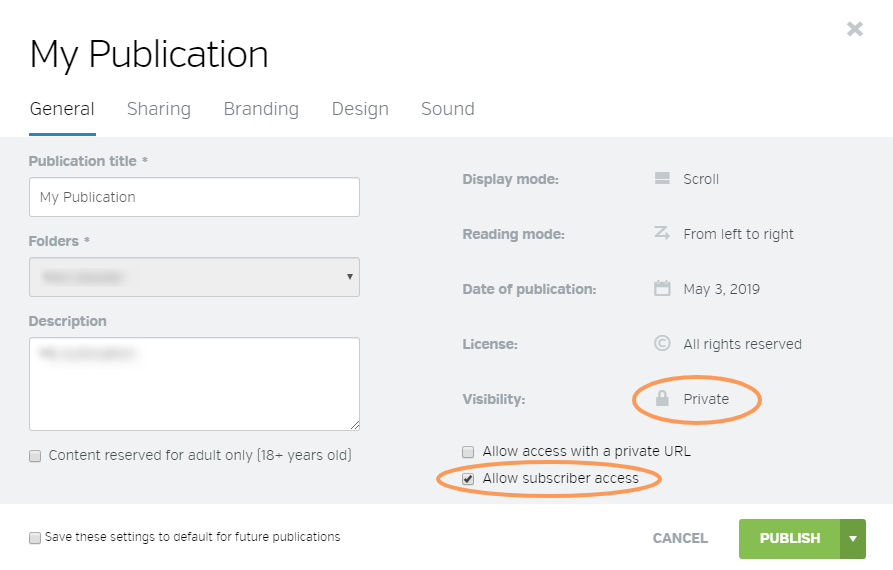
Never underestimate the power of exclusivity to grow your subscribers. In other words, subscribers value knowing that they are the only ones who can get this privileged information from your content! Calaméo offers you the possibility to assign exclusive access to your subscribers. While exclusivity can keep subscribers happy, it also has the ability to attract a lot of new readers and can give a definite boost to your chances of building a loyal subscriber base.
Here’s how:
Control the Distribution
You can further control the distribution of your content on Calaméo by limiting the way your readers can view to your content with individual usernames and passwords. Calaméo allows you to assign three types of access:
Single – the subscriber is assigned access to selected individual publications
Period – the subscriber can access all of your publications published between two chosen dates For example: all publications between January 1, 2020 and January 1, 2021
Series – the subscriber will have access to a set number of publications published from a specific date onward For example: 12 publications beginning on January 1, 2020
Read more on how to manage your subscriber sessions here.
For more tips and ideas to inspire your digital publishing, have a look at our review of the year’s top strategies.
Why publish an online magazine (instead of emailing a PDF)
Publishing an online magazine from a PDF isn’t just about “uploading a file” and sharing a link. If your goal is to grow an audience, boost visibility, and drive measurable actions (subscriptions, clicks, inquiries, sales), you need to treat your magazine like a real content asset.
A high-performing online magazine usually comes down to four pillars:
A clean embed on your website (to capture traffic, reinforce your brand, and improve SEO)
A multichannel distribution plan (website, email, social)
A solid mobile experience
Consistent analytics (UTMs + KPIs) so you can see what works and improve issue after issue
Publishing an online magazine means making editorial content accessible on any screen, easy to share, and measurable. The goal isn’t just display—it’s distribution (email/social/website), visibility (SEO), and analysis (engagement, sources, clicks).
Quick pre-publish checklist
Prep a landing page (SEO + context)
Plan distribution (website, email, social)
Add CTAs / links (subscribe, contact, offer)
Track (UTMs, KPIs, reporting)
Improve using the data (most-read sections)
Why choose Calaméo to publish an online magazine (from a PDF)
If you want to publish an online magazine that’s easy to read on mobile, easy to share, embeddable on your website, and measurable, Calaméo is a strong option. The goal isn’t just “put the PDF online”—it’s building a complete setup: reading experience + distribution + SEO + analytics.
Fast publishing, no technical headache
Calaméo lets you turn a PDF into a digital publication in just a few steps, without needing custom development. For a marketing or editorial team, that matters: you can publish new issues quickly, iterate, and keep a consistent release rhythm.
Publish directly from a PDF
A reading experience designed for the web
Easy updates and issue management for your team
A better reading experience (especially on mobile)
Most reading happens on smartphones now. Calaméo gives you a web-friendly experience compared to sending a PDF attachment: smoother navigation, better comfort, improved accessibility, and less friction.
Mobile-first reading (depending on your publication setup)
More intuitive navigation than a raw PDF (TOC/markers, depending on how you set it up)
To maximize SEO and keep control of your traffic, the best approach is to embed your magazine on your own domain—on an optimized “Issue” page. Calaméo supports that: you can share via link and/or embed the publication on a WordPress page, a landing page, or a “Magazine” hub page.
Website embedding (dedicated page) to reinforce your brand
A hub approach: issue page + archives + topic collections
Better alignment with your content strategy (SEO + conversion)
Distribution and privacy options that fit professional use cases
A magazine can be public (to acquire traffic) or restricted (subscribers, clients, internal). Depending on your needs, Calaméo lets you adjust how you share: open publication, link-based sharing, or more restricted access (based on your plan and settings).
Public distribution to grow reach
Controlled sharing when content is restricted
Alignment between goals (audience) and constraints (privacy)
Data-driven improvement, issue after issue
Publishing is just step one. What makes the difference is continuous optimization. With Calaméo, you can analyze publication performance and connect your distribution actions to measurable outcomes.
Performance tracking (views, engagement, clicks—depending on your plan)
Ability to structure tracking with UTMs (email, social, QR, partners)
Editorial optimization: see what truly grabs attention and what drives clicks
Built to drive actions (not just reading)
An online magazine can support business goals: subscriptions, contact requests, quote requests, traffic to key pages. Calaméo fits well here because it helps create a reading experience that pushes users toward useful next steps (landing pages, forms, product pages, etc.).
Links and CTAs placed where they matter (not only at the end)
Shorter path from reading to action (less friction)
Click measurement to improve CTR and conversion
Calaméo is a great fit if… – You publish issues regularly (magazine, journal, long-form newsletter) – You want to centralize distribution on a dedicated page (SEO + measurement) – You need something easy for a marketing/editorial team to run – You want to measure and optimize (sources, clicks, engagement) – You want a higher-quality experience than a PDF email attachment
How to plug it into your workflow (simple recommendation)
To get the most out of Calaméo with WordPress, a proven approach is:
Create an “Issue” page on your website (summary + table of contents + CTA)
Add the Calaméo publication (embed or a “Read” button)
Drive all channels to that page (email, social, QR)
Tag links with UTMs and track your KPIs
Reuse the same template for every issue (make it repeatable)
Step 1 — Prep your PDF for online reading
Check readability (and avoid “fake problems”)
A PDF can look perfect in print and still be hard to read on mobile. Before publishing, check:
font size (comfortable on screen)
contrast (text too light, busy backgrounds)
margins (content too close to edges)
consistency in headings and sections (mental navigation)
Reduce PDF weight without killing quality
File weight directly impacts the experience: heavier files load slower, and slow loads increase drop-off. Aim for a reasonable balance:
An online magazine isn’t just “for reading”—it should guide people. Plan for:
a clickable table of contents (if possible)
stable sections (so you can compare performance over time)
action zones: subscribe, explore an offer, contact, download
Step 2 — Choose the format: flipbook, scrolling, or hybrid
There’s no one “best format.” It depends on your audience and your goal.
Flipbook: magazine feel and navigation
A flipbook makes sense if you want to:
keep the page-flip experience
showcase layout and design
offer a print-like navigation feel
Scrolling: efficient, faster reading
A scrolling format (web-page style) works well if:
your content reads like an article
you want a more mobile-first experience
you want more indexable text around the content
Hybrid approach (often the most effective)
In practice, a strong strategy is to:
publish the magazine (flipbook/reader)
host it on a dedicated page with contextual text (summary, TOC, highlights, links)
turn key sections into SEO articles (excerpts) that link back to the full issue
Step 3 — Build one landing page per issue (the core of SEO)
A common mistake is sharing a magazine via a simple link without building a page on your own domain. The result: weak SEO visibility, less control over the reader journey, and fragmented measurement.
Recommended structure for an “Issue” page
Your page should stand on its own as real content. A simple, effective structure:
1) Clear title + promise
Example: “Magazine X — January 2026 Issue: trend A, feature B, interview C.”
2) Summary (5–8 lines)
Explain what readers will get, using the words your audience actually searches for (helps SEO and LLMs).
3) Table of contents (bullets work great)
Feature story: …
Interview: …
Picks/selection: …
Events/agenda: …
4) “Key takeaways” block (3–5 bullets)
Great for featured snippets and AI answers.
5) Primary CTA + secondary CTA
Primary: “Subscribe” / “Get the next issue” / “Explore the offer”
Secondary: “Download the print version” / “Contact the editorial team”
6) Embedded reader (or a “Read the magazine” button)
If you embed, leave enough space and make sure it’s responsive. If not, a clear “Read the magazine” button works well.
7) Links to archives and related content
Add:
“All issues”
“Topic collections”
“Related articles”
Simple, practical SEO wins
One dedicated page per issue (stable, descriptive URL)
What matters is consistency (same logic every issue).
Repeatable monthly reporting
top sources (+ trend)
top clicked links
best-performing sections/pages
2–3 recommendations for the next issue
Step 6 — Improve issue after issue (the optimization loop)
Your advantage compounds over time when you systematize:
repeat what performs (sections, angles, CTAs)
remove friction (mobile, speed, navigation)
build topic pages that recycle content (evergreen SEO)
turn top themes into long-form SEO articles (acquisition)
Common mistakes (and how to avoid them)
Publishing without a dedicated page
Without an issue page, you lose SEO, journey control, and conversion opportunities.
Sending the PDF as an email attachment
You lose tracking, update flexibility, and often the mobile experience.
Too many generic CTAs
Better: 1 primary CTA, 1 secondary, plus contextual CTAs in the right sections.
No UTM tracking
Without UTMs, you can’t reliably compare email vs social vs QR vs SEO.
Conclusion
A strong online magazine is a system: dedicated page + multichannel distribution + tracking + continuous improvement. Once that foundation is in place, every issue becomes a longer-lasting asset that shares better and drives measurable results.
CTA suggestion (edit as needed)
Button: “Publish your next issue”
Secondary button: “Set up clean tracking (UTM/GA4)”
FAQ
How do I publish a PDF as an online magazine with Calaméo?
Upload your PDF to Calaméo, publish it as an online magazine, then create an “Issue” page on your site (summary + TOC + CTA) that embeds the publication (or links to it). Add UTMs to your distribution links to measure what performs.
How do I embed a Calaméo magazine on WordPress?
Create (or open) your WordPress issue page, paste the Calaméo embed code/block, then check mobile rendering. Add text around it (summary, highlights, key topics) to improve the experience and strengthen SEO.
How do I get a Calaméo magazine to show up on Google?
Don’t rely on the embed alone. Publish each issue on a dedicated page with unique text (summary, topics, highlights), strong internal linking (“Magazine” hub, related articles), and solid mobile performance. That’s what helps Google understand and index the page.
Can I track Calaméo publication visits in GA4?
Yes. Use UTM-tagged links in emails, social posts, QR codes, and paid campaigns so GA4 can identify sources. Then combine that with publication stats to analyze engagement and outcomes.
What analytics can Calaméo track for a digital magazine?
In practice, you’ll want to track audience (views/readers), engagement (reading depth and time), and clicks (actions). With well-structured UTMs, you can connect performance to channels and campaigns (email, social, QR, ads). Calaméo can track things like:
Total views (overall volume)
Total downloads (strong intent signal)
Total pages viewed (reading depth)
Average reading time (retention/quality)
Total clicks (interaction on links)
Shares, favorites, comments (engagement/virality)
Device breakdown (desktop/mobile/tablet)
Reader location (geography)
Views by hour (timing insights)
And with GA4 properly set up, you can go further by:
Getting more realistic unique-user views
Analyzing the full journey (before/during/after reading)
Is it better to email a PDF attachment or share a Calaméo link?
Share a link. It’s easier on mobile, easier to update, and much easier to track. Attachments make measurement harder and often degrade the reading experience.
Flipbook or scrolling PDF: what works best for an online magazine?
Flipbooks preserve the “magazine” feel and highlight layout. Scrolling is more direct and often more mobile-first. The most effective setup is often hybrid: an SEO-optimized issue page plus the embedded (or linked) Calaméo publication.