Email marketing remains one of the most powerful tools for building customer loyalty and driving conversions.But to fully leverage your campaigns, your online publications—brochures, catalogs, white papers, or flipbooks—can become much more than simple informational assets. With Calaméo and its integrations with platforms such as MailerLite and Mailchimp, your content can turn into a strategic lever for lead generation, audience segmentation, and marketing automation.

Collect leads directly from your publications
Traditionally, email address collection relies on external forms or landing pages. With Calaméo, however, you can embed MailerLite or Mailchimp forms directly into your publications.
Concrete examples:
Product catalog: a subscription button placed after the presentation of your new products allows interested readers to join your mailing list in just one click.
Guide or white paper: an embedded form at the end of the document turns your content into an effective lead magnet.
Benefit: readers don’t need to leave your publication, reducing friction and significantly increasing sign-up rates.
All Calaméo publications generate valuable reader data: pages viewed, time spent on each page, links clicked, and more. This data can be used to segment your subscribers in MailerLite or Mailchimp.
How it works:
Create subscriber groups based on readers’ real interests.
Tailor your messages according to their interactions—for example, send specific offers to readers who viewed your premium catalog.
Prioritize communications based on engagement: the more a reader interacts with your publications, the more likely they are to receive targeted and personalized content.
Benefit: you send relevant campaigns to each segment, improving both user experience and conversion rates.
Automation and marketing workflows triggered by publications
With MailerLite and Mailchimp, your publications can trigger automated marketing workflows:
Welcome series: as soon as a reader signs up via an embedded form, they automatically receive your welcome emails.
Exclusive content delivery: share additional resources reserved for your most engaged subscribers.
Sales follow-ups: if a prospect views your catalog and signs up via an embedded form but doesn’t complete a purchase, an automated follow-up email can be sent.
Benefit: your publications become an active engine of your marketing strategy, saving time while maintaining personalized communication with your readers.
Performance analysis and campaign optimization
Integration with MailerLite and Mailchimp allows you to track the impact of your publications on your email campaigns: open rates, click-through rates, generated sign-ups, and more.
Practical applications:
Identify which publications attract the most new subscribers.
Determine which content is the most engaging and replicate its success.
Optimize your forms and messaging based on observed behavior to maximize conversions.
Benefit: your publications become powerful tools for continuous optimization of your email marketing strategy.
Conclusion: your publications become engagement drivers
With Calaméo, your brochures, catalogs, and flipbooks are no longer just informative assets. When integrated with MailerLite or Mailchimp, they become powerful tools to collect leads, segment audiences, automate campaigns, and analyze performance.
In short, every Calaméo publication can contribute to strengthening your email marketing strategy and turning reader engagement into tangible business results.
In the digital age, virtual libraries have become essential tools for organizing, sharing and accessing online resources. Thanks to technological advances and new solutions such as the Library Widget from Calaméo, it’s easier than ever to create a virtual library that meets users’ modern needs. In this article, we’ll explore the key steps to creating your own virtual library and show you how to make the most of the tools available.
A virtual library is an organized collection of digital documents, accessible online. Unlike ordinary libraries, virtual libraries offer unlimited accessibility, simplified content management and the ability to adapt to the needs of their users.
Here’s an example of a virtual library created with Calaméo:
Why you should create a virtual library: the major advantages
Optimized visual display
One of the greatest advantages of creating a virtual library is the simple, interactive way of showcasing your publications. Whether you want to display every issue of your magazine or a varied collection of documents, the virtual library enhances the visual impact of your content. Thanks to intuitive navigation, visitors can easily browse your virtual shelves and click on a cover to open the publication in full screen or in a new window. They can then easily return to your virtual library once they’ve finished reading.
Automatic updates
Automatic updates make it easy to manage your virtual library. Every time you add a new publication to your Library Folder on Calaméo, it instantly appears on your virtual shelves. By choosing to create a virtual library, you’re freed from repetitive manual management tasks. Removing publications is just as easy: mark them as private or move them to another Folder to adjust their accessibility with a few clicks.
In-depth analytics
When you create a virtual library, you also benefit from detailed analytics on how your audience interacts with your publications. You can track views, link clicks, downloads and traffic origin. These analyses enable you to adapt your content to better meet your audience’s expectations and improve engagement with your virtual library.
Why choose Calaméo to create your virtual library?
To create an effective virtual library, it’s essential to choose a platform tailored to your needs. Several solutions are available on the market, but the Library Widget from Calaméo stands out for its ease of use, intuitive interface and numerous advanced features. This solution is ideal for those who want to create a virtual library quickly and without any particular technical skills.
By using this feature, you benefit from :
Easy embeding on your website: Calaméo enables effortless embeding of your virtual library on your website, which means you can showcase your digital resources in a harmonious, professional way.
Visual customization to match your brand: Thanks to a variety of customization options, you can adapt the appearance of your library to reflect your brand identity and blend seamlessly into the pages of your website.
Numerous options for sharing and distributing your publications: With Calaméo, you can easily share your publications on social networks or by e-mail. This enables you to reach a wider audience and increase the visibility of your resources.
Step 1: Publish and organize your documents on Calaméo
Organizing your documents is a key step in ensuring an optimal user experience and smooth navigation in your virtual library. To ensure that your publications are easily accessible and well structured, it’s important to prepare them well before publishing them on Calaméo.
Start by publishing your digital documents on Calaméo. Each publication should be accompanied by a catchy, descriptive title, incorporating relevant keywords linked to your content. Don’t forget to fill in the description of each publication with clear, engaging summaries that will encourage users to discover your content.
Next, organize your publications by placing them in Folders or adding them to a Favorites list. For these documents to be visible in your virtual library, it is essential that Folders and publications are defined as public.
NOTE: Private publications will not be displayed in the Library Widget, giving you total control over what is visible to your users.
All you have to do is select the Folder (or favorites list) whose contents you wish to display in your virtual library. All public publications in this folder will automatically appear in your library, making it easy to manage your documents without any extra effort.
Step 2: Customize the appearance of your Library Widget
Personalizing your virtual library is essential to ensuring a user experience that reflects your brand identity. Thanks to the many customization options offered by the Calaméo Library Widget, you can adjust the appearance of your library so that it blends seamlessly with your website while reinforcing your brand image.
You can adjust the following elements of your Library Widget:
The texture or background color of the library to match the style of your website.
The number of shelves to display to visually organize your publications.
The size of your publication thumbnails for optimized display.
The information to be displayed for each publication (such as title or description).
The order in which your publications appear, allowing you to highlight certain strategic documents.
The way publications open (in a new window or full screen).
You can also adjust the appearance of thumbnails by choosing, for example, a shadow or other visual effects that enhance the impact of your publications. These subtle details play a key role in enhancing the aesthetics and navigation of your virtual library.
TIP: While you’re customizing the look and feel of your Calaméo Library Widget, you can see the changes in real time thanks to the preview function. This allows you to test different configurations and ensure that each modification fits perfectly into your overall site before finalizing the upload.
By customizing your virtual library with these options, you offer your users a fluid, visually appealing experience, while reinforcing your brand identity at every stage.
Step 3: Embed the Calaméo Library Widget into your website
Once you’ve carefully customized the look and feel of your virtual library, the next step is to embed it directly into your website. This step is crucial to making your virtual library accessible to your users and enabling smooth navigation between your content and the other pages of your site.
Embeding the Calaméo Library Widget is quick and easy, and you have several options for doing so. Once you’re happy with the configuration and design of your virtual library, simply copy the embed code provided by Calaméo. This code can be inserted on any page of your website, whether on a page dedicated to your publications or another section of your site.
This intuitive process makes it easy to present your digital document collections in a professional, interactive way.
READ MORE: If you need help with embedding, resources such as the tutorial or the support pagein the Calaméo Help Center are available to guide you step by step.
By embedding a Calaméo library on your site, you enable your visitors to easily explore your digital publications directly from your platform, without having to navigate to another site. This not only enhances the user experience, but also reinforces the consistency of your brand image by providing seamless access to your documents in a controlled environment.
Embeding requires no advanced technical skills and, once the code has been inserted, your virtual library will be automatically updated every time you publish new documents or modify existing ones. So you don’t have to worry about manually keeping your library up to date, which saves you and your team valuable time.
With just a few clicks, you can create a dynamic, scalable virtual library that blends seamlessly with your website, while enriching your users’ experience and facilitating access to your digital content.
Conclusion
Creating a virtual library represents a unique opportunity to modernize your content management and improve access to your digital resources. With the Calaméo Library Widget, you have a powerful and flexible tool at your disposal to set up a virtual library perfectly adapted to your needs.
Don’t wait any longer, transform the way you share information by starting to build your virtual library with Calaméo today!
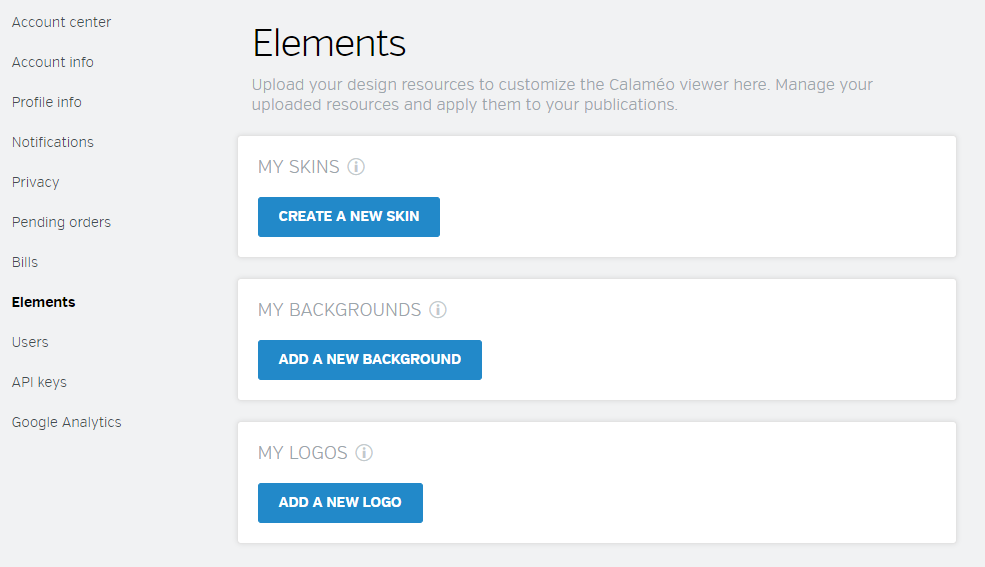
Want to reinforce your brand identity on Calaméo? Nothing could be easier! With our platform, you can add your logo directly to the viewer, so your readers will see it every time they open one of your documents.
In this article, discover our video tutorial “How to add your logo to the Calaméo viewer” — a step-by-step guide to help you personalize your publications and highlight your brand.
Please note that this feature is available for PREMIUM and PLATINUM users only.
Why add your logo to the viewer?
Displaying your logo on the Calaméo viewer is a great way to strengthen your brand image and provide a professional reading experience for your audience.
Whether you’re publishing a magazine, a catalog, a corporate report, or a brochure, this personalization feature helps make your publications unique and instantly recognizable.
Key benefits:
Enhance your visual identity: Your logo appears on all your publications, ensuring a consistent and professional brand image.
Boost brand awareness: Readers immediately associate your content with your brand.
Unify your communications: Maintain a consistent visual signature across all your digital materials.
A step-by-step video tutorial
Adding your logo to the Calaméo viewer is simple and fast. Our video tutorial “How to add your logo to the Calaméo viewer” walks you through each step, helping you configure this feature in just a few clicks.
Don’t forget to turn on subtitles (available in 7 languages).
Conclusion
Customizing the Calaméo viewer with your logo is a simple yet powerful way to showcase your brand and offer your readers a unique, professional reading experience.
Whether you’re a business, an institution, or a content creator, this feature helps you make every publication look polished and aligned with your brand identity.