The Internet changed the way people book and purchase holidays—and so travel companies have adjusted, too. Digital travel brochures accommodate new habits by allowing customers to browse destinations and vacation options online.
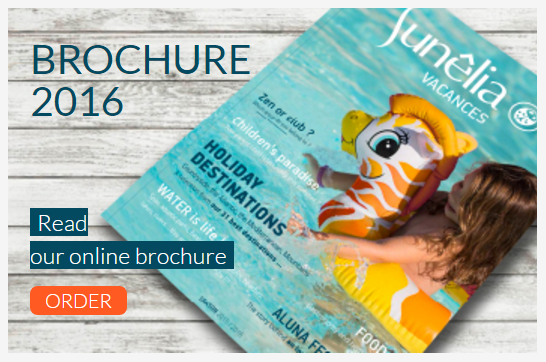
Online brochures also offer a great-looking flipbook alternative to a PDF, and an interactive reading experience. Here is a selection of some of our favorites published with Calaméo…
So what are the other advantages of digital travel brochures? Allow us to explain further…
Maximum convenience
A online version is instantly accessible to your readers at anytime, anywhere, on any device. Bonus: it also can’t be lost or left behind somewhere!
Zero printing and distribution costs
And all while saving trees. With unlimited pages per Calaméo publication and no printing costs to worry about, your brochures can be as long as you like with as many high quality, expensive-to-print images as you like. For users who don’t enjoy reading on a screen, you can even activate the Download and Print icons on the reader. Your brochures can be embedded in your website, distributed by email, or posted on social media pages.
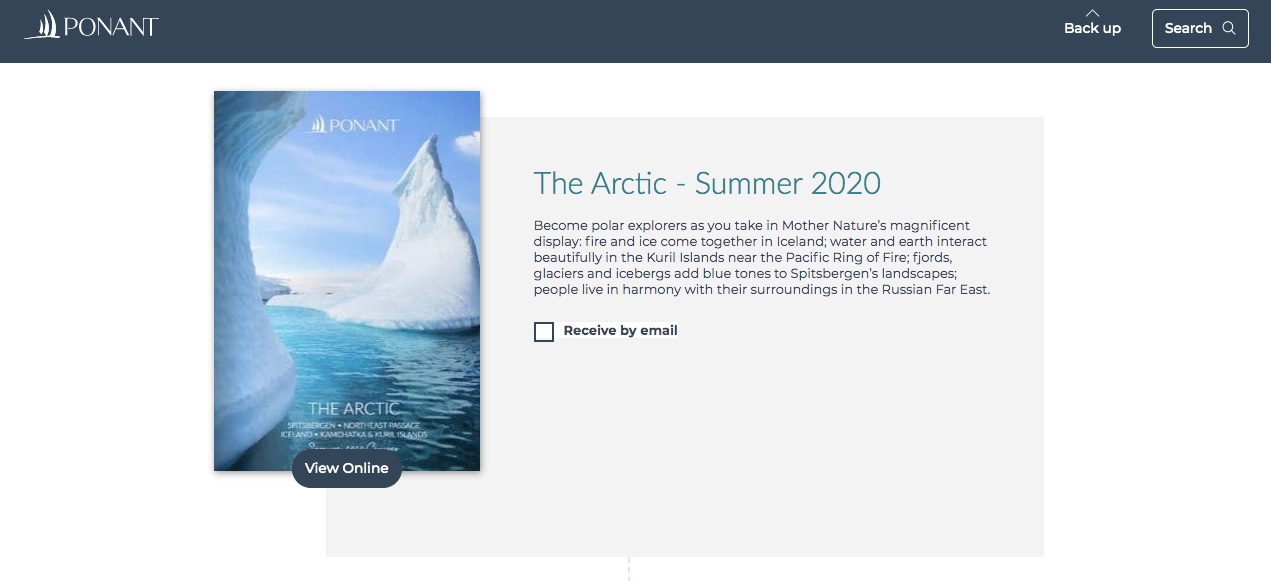
For example, here is how Ponant make their brochures consultable via their website:
Captivating, interactive and engaging
Your customers can zoom in on high definition photographs.
You can add links to navigate within the brochure and to other webpages for more information.
Take your reader to their dream destination by adding videos which capture places at their best and immerse your reader:
Destination and content data
Thanks to advanced statistics, you can track key audience information. Find out which pages have the most engagement and which links receive the most clicks. Then you’ll have a strong idea which destinations are of most interest, or what elements constitute a successful page of a brochure.
Always up-to-date
You can upload an updated version of an online brochure at any time, without changing the URL where it is hosted. Plus, Calaméo can save any existing links you’ve created and includes them automatically in the new version of the document.
To sum it up, digital travel brochures on Calaméo offer convenience, accessibility and engaging features for both you and your customers. If you have brochures to distribute, join Calaméo for free and start publishing today!

Portable Document Format (PDF) is a file format used to present documents in a manner independent of application software and operating systems. The format was established in the early 90’s and has since been widely used around the world. But PDFs do come with some disadvantages in the modern business world.
The creators of PDFs originally designed the format for printing and features have since been added. However, many do not hold up to the high standards of enriched multimedia document technology that we have today.
In this article, learn about the top three problems with relying solely on PDFs. Plus, we will explain how Calaméo can help transform your PDF documents for your business needs.
What are common issues with relying on PDFs?
DISPLAY
PDFs are not screen-friendly and are often ill-formatted on small devices like tablets and mobile phones. As a result, finding the right page can mean minutes wasted scrolling unnecessarily within a document.
TECHNOLOGICAL COMPATIBILITY
PDFs have always been difficult to integrate on webpages. For example, without the necessary plugins, users are often prompted to download and view the file in a separate application.
In addition, PDFs make it almost impossible for you to engage your readers with interactive content. That’s because images and videos are cumbersome to include within the document. Unless you’ve added dynamic links to the document, viewers cannot even click on links provided in the PDF itself. Thus, PDFs actually get in the way of a seamless online user experience.
ONLINE VISIBILITY
Finally, one of the biggest disadvantages: PDFs tend to lack key information that search engines need in order to understand exactly what your document is about. When your content is hosted on a high PageRank website like Calaméo, search engines index it quicker and make it appear higher in their search results.
Which PDF alternative should I use?
Calaméo is the perfect solution to bring your documents into the digital era. Our HTML5-based publication viewer requires no plug-ins and adapts perfectly to any screen.
Moreover, with our high-speed document conversion technology and user-friendly Editor, you can transform your documents from dull and lifeless PDFs to enriched interactive documents in a matter of minutes.
You can also make the most of our Statistics. The detailed insights about your readership they offer can be vital for optimizing your publications’ content, ad revenue and more.
Conclusion
Of course, PDFs are still a valuable resource for the sharing and viewing documents. However, we strongly advise using intuitive conversion platforms such as Calaméo to help you to publish and share your documents in the most professional manner. Our online solution gives your digital publications in the best possible presentation, guiding your readers from browsing to action.
Haven’t tried digital publishing for your documents yet? Join Calaméo today and see the difference for yourself. It’s fast, easy and free to start.
Why publish an online magazine (instead of emailing a PDF)
Publishing an online magazine from a PDF isn’t just about “uploading a file” and sharing a link. If your goal is to grow an audience, boost visibility, and drive measurable actions (subscriptions, clicks, inquiries, sales), you need to treat your magazine like a real content asset.
A high-performing online magazine usually comes down to four pillars:
A clean embed on your website (to capture traffic, reinforce your brand, and improve SEO)
A multichannel distribution plan (website, email, social)
A solid mobile experience
Consistent analytics (UTMs + KPIs) so you can see what works and improve issue after issue
Publishing an online magazine means making editorial content accessible on any screen, easy to share, and measurable. The goal isn’t just display—it’s distribution (email/social/website), visibility (SEO), and analysis (engagement, sources, clicks).
Quick pre-publish checklist
Prep a landing page (SEO + context)
Plan distribution (website, email, social)
Add CTAs / links (subscribe, contact, offer)
Track (UTMs, KPIs, reporting)
Improve using the data (most-read sections)
Why choose Calaméo to publish an online magazine (from a PDF)
If you want to publish an online magazine that’s easy to read on mobile, easy to share, embeddable on your website, and measurable, Calaméo is a strong option. The goal isn’t just “put the PDF online”—it’s building a complete setup: reading experience + distribution + SEO + analytics.
Fast publishing, no technical headache
Calaméo lets you turn a PDF into a digital publication in just a few steps, without needing custom development. For a marketing or editorial team, that matters: you can publish new issues quickly, iterate, and keep a consistent release rhythm.
Publish directly from a PDF
A reading experience designed for the web
Easy updates and issue management for your team
A better reading experience (especially on mobile)
Most reading happens on smartphones now. Calaméo gives you a web-friendly experience compared to sending a PDF attachment: smoother navigation, better comfort, improved accessibility, and less friction.
Mobile-first reading (depending on your publication setup)
More intuitive navigation than a raw PDF (TOC/markers, depending on how you set it up)
To maximize SEO and keep control of your traffic, the best approach is to embed your magazine on your own domain—on an optimized “Issue” page. Calaméo supports that: you can share via link and/or embed the publication on a WordPress page, a landing page, or a “Magazine” hub page.
Website embedding (dedicated page) to reinforce your brand
A hub approach: issue page + archives + topic collections
Better alignment with your content strategy (SEO + conversion)
Distribution and privacy options that fit professional use cases
A magazine can be public (to acquire traffic) or restricted (subscribers, clients, internal). Depending on your needs, Calaméo lets you adjust how you share: open publication, link-based sharing, or more restricted access (based on your plan and settings).
Public distribution to grow reach
Controlled sharing when content is restricted
Alignment between goals (audience) and constraints (privacy)
Data-driven improvement, issue after issue
Publishing is just step one. What makes the difference is continuous optimization. With Calaméo, you can analyze publication performance and connect your distribution actions to measurable outcomes.
Performance tracking (views, engagement, clicks—depending on your plan)
Ability to structure tracking with UTMs (email, social, QR, partners)
Editorial optimization: see what truly grabs attention and what drives clicks
Built to drive actions (not just reading)
An online magazine can support business goals: subscriptions, contact requests, quote requests, traffic to key pages. Calaméo fits well here because it helps create a reading experience that pushes users toward useful next steps (landing pages, forms, product pages, etc.).
Links and CTAs placed where they matter (not only at the end)
Shorter path from reading to action (less friction)
Click measurement to improve CTR and conversion
Calaméo is a great fit if… – You publish issues regularly (magazine, journal, long-form newsletter) – You want to centralize distribution on a dedicated page (SEO + measurement) – You need something easy for a marketing/editorial team to run – You want to measure and optimize (sources, clicks, engagement) – You want a higher-quality experience than a PDF email attachment
How to plug it into your workflow (simple recommendation)
To get the most out of Calaméo with WordPress, a proven approach is:
Create an “Issue” page on your website (summary + table of contents + CTA)
Add the Calaméo publication (embed or a “Read” button)
Drive all channels to that page (email, social, QR)
Tag links with UTMs and track your KPIs
Reuse the same template for every issue (make it repeatable)
Step 1 — Prep your PDF for online reading
Check readability (and avoid “fake problems”)
A PDF can look perfect in print and still be hard to read on mobile. Before publishing, check:
font size (comfortable on screen)
contrast (text too light, busy backgrounds)
margins (content too close to edges)
consistency in headings and sections (mental navigation)
Reduce PDF weight without killing quality
File weight directly impacts the experience: heavier files load slower, and slow loads increase drop-off. Aim for a reasonable balance:
An online magazine isn’t just “for reading”—it should guide people. Plan for:
a clickable table of contents (if possible)
stable sections (so you can compare performance over time)
action zones: subscribe, explore an offer, contact, download
Step 2 — Choose the format: flipbook, scrolling, or hybrid
There’s no one “best format.” It depends on your audience and your goal.
Flipbook: magazine feel and navigation
A flipbook makes sense if you want to:
keep the page-flip experience
showcase layout and design
offer a print-like navigation feel
Scrolling: efficient, faster reading
A scrolling format (web-page style) works well if:
your content reads like an article
you want a more mobile-first experience
you want more indexable text around the content
Hybrid approach (often the most effective)
In practice, a strong strategy is to:
publish the magazine (flipbook/reader)
host it on a dedicated page with contextual text (summary, TOC, highlights, links)
turn key sections into SEO articles (excerpts) that link back to the full issue
Step 3 — Build one landing page per issue (the core of SEO)
A common mistake is sharing a magazine via a simple link without building a page on your own domain. The result: weak SEO visibility, less control over the reader journey, and fragmented measurement.
Recommended structure for an “Issue” page
Your page should stand on its own as real content. A simple, effective structure:
1) Clear title + promise
Example: “Magazine X — January 2026 Issue: trend A, feature B, interview C.”
2) Summary (5–8 lines)
Explain what readers will get, using the words your audience actually searches for (helps SEO and LLMs).
3) Table of contents (bullets work great)
Feature story: …
Interview: …
Picks/selection: …
Events/agenda: …
4) “Key takeaways” block (3–5 bullets)
Great for featured snippets and AI answers.
5) Primary CTA + secondary CTA
Primary: “Subscribe” / “Get the next issue” / “Explore the offer”
Secondary: “Download the print version” / “Contact the editorial team”
6) Embedded reader (or a “Read the magazine” button)
If you embed, leave enough space and make sure it’s responsive. If not, a clear “Read the magazine” button works well.
7) Links to archives and related content
Add:
“All issues”
“Topic collections”
“Related articles”
Simple, practical SEO wins
One dedicated page per issue (stable, descriptive URL)
What matters is consistency (same logic every issue).
Repeatable monthly reporting
top sources (+ trend)
top clicked links
best-performing sections/pages
2–3 recommendations for the next issue
Step 6 — Improve issue after issue (the optimization loop)
Your advantage compounds over time when you systematize:
repeat what performs (sections, angles, CTAs)
remove friction (mobile, speed, navigation)
build topic pages that recycle content (evergreen SEO)
turn top themes into long-form SEO articles (acquisition)
Common mistakes (and how to avoid them)
Publishing without a dedicated page
Without an issue page, you lose SEO, journey control, and conversion opportunities.
Sending the PDF as an email attachment
You lose tracking, update flexibility, and often the mobile experience.
Too many generic CTAs
Better: 1 primary CTA, 1 secondary, plus contextual CTAs in the right sections.
No UTM tracking
Without UTMs, you can’t reliably compare email vs social vs QR vs SEO.
Conclusion
A strong online magazine is a system: dedicated page + multichannel distribution + tracking + continuous improvement. Once that foundation is in place, every issue becomes a longer-lasting asset that shares better and drives measurable results.
CTA suggestion (edit as needed)
Button: “Publish your next issue”
Secondary button: “Set up clean tracking (UTM/GA4)”
FAQ
How do I publish a PDF as an online magazine with Calaméo?
Upload your PDF to Calaméo, publish it as an online magazine, then create an “Issue” page on your site (summary + TOC + CTA) that embeds the publication (or links to it). Add UTMs to your distribution links to measure what performs.
How do I embed a Calaméo magazine on WordPress?
Create (or open) your WordPress issue page, paste the Calaméo embed code/block, then check mobile rendering. Add text around it (summary, highlights, key topics) to improve the experience and strengthen SEO.
How do I get a Calaméo magazine to show up on Google?
Don’t rely on the embed alone. Publish each issue on a dedicated page with unique text (summary, topics, highlights), strong internal linking (“Magazine” hub, related articles), and solid mobile performance. That’s what helps Google understand and index the page.
Can I track Calaméo publication visits in GA4?
Yes. Use UTM-tagged links in emails, social posts, QR codes, and paid campaigns so GA4 can identify sources. Then combine that with publication stats to analyze engagement and outcomes.
What analytics can Calaméo track for a digital magazine?
In practice, you’ll want to track audience (views/readers), engagement (reading depth and time), and clicks (actions). With well-structured UTMs, you can connect performance to channels and campaigns (email, social, QR, ads). Calaméo can track things like:
Total views (overall volume)
Total downloads (strong intent signal)
Total pages viewed (reading depth)
Average reading time (retention/quality)
Total clicks (interaction on links)
Shares, favorites, comments (engagement/virality)
Device breakdown (desktop/mobile/tablet)
Reader location (geography)
Views by hour (timing insights)
And with GA4 properly set up, you can go further by:
Getting more realistic unique-user views
Analyzing the full journey (before/during/after reading)
Is it better to email a PDF attachment or share a Calaméo link?
Share a link. It’s easier on mobile, easier to update, and much easier to track. Attachments make measurement harder and often degrade the reading experience.
Flipbook or scrolling PDF: what works best for an online magazine?
Flipbooks preserve the “magazine” feel and highlight layout. Scrolling is more direct and often more mobile-first. The most effective setup is often hybrid: an SEO-optimized issue page plus the embedded (or linked) Calaméo publication.