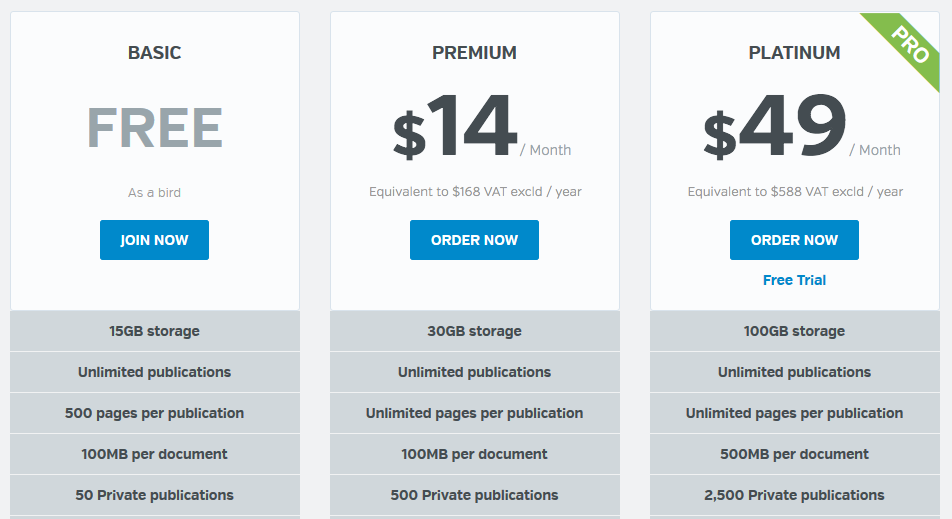
Accepting larger files means that you won’t need to worry about reducing your document size before uploading it to Calaméo. Have you included lots of images and data-rich elements in your document? No problem: our powerful conversion technology handles complex files with ease. With no limit on the number of pages, you can publish even very long documents in just one click.
Stay tuned for more exciting updates, coming soon from Calaméo!
You’ll find more information about publishing your documents in our Help Center, from the types of files you can convert on Calaméo to enabling Right-to-Left reading. Plus, our Support Team is standing by to answer your questions! Send us a message at contact@calameo.com, any time.

Want to share your documents online easily and reach a wide audience? With Calaméo, publishing your digital content is simple and hassle-free. In this article, discover our step-by-step video tutorial “How to publish on Calaméo” your guide to transforming files into interactive publications available anytime, anywhere.
Why publish on Calaméo?
Publishing on Calaméo allows you to upload brochures, catalogs, magazines, or annual reports in just a few clicks. Whether you’re a business, institution, or content creator, our platform helps you showcase your documents and maximize their visibility.
The benefits of publishing on Calaméo
Publishing on Calaméo means more than just putting a file online—it’s about bringing your content to life in a dynamic, accessible, and professional way. Here are a few key advantages:
Fast distribution: Upload your document and share it instantly with your audience.
Accessible on all devices: Your publications can be viewed on desktops, tablets, or smartphones.
Interactivity: Add links, videos, or forms to enhance the reading experience.
Easy sharing: Embed your publications on your website or blog, or share them on social media.
Performance tracking: Monitor your publication stats and refine your content strategy.
A video tutorial to guide you: How to Publish on Calaméo
Publishing a document on Calaméo is fast, intuitive, and requires no technical skills. Our video tutorial walks you through every step so you can publish with confidence.
Publishing on Calaméo is a key step in showcasing your content and sharing it effectively with your audience. Our platform offers a fast, professional, and interactive solution to turn your files into true digital publications.
Publishing a document online is good. Turning it into a real conversion tool is even better. With Calaméo, your catalogs, brochures, magazines, or presentations can become interactive assets capable of generating leads, boosting sales, and strengthening customer loyalty. In this blog post, discover step by step how to turn your publications into high-performing conversion tools.
Add forms to capture leads
The first step to transforming your publications into conversion tools is to create a direct point of contact with your readers. And nothing works better for that than an embedded form.
Add your form directly in your publication using the Calaméo Editor.
Goal: Collect qualified leads directly from your content without sending visitors to an external page.
Track performance with Calaméo stats
Monitoring your content’s performance is essential. Calaméo provides detailed insights into how your readers interact with your publications.
Key metrics to watch:
Views: Measure your publication’s reach.
Average reading time: Identify the pages that engage readers the most.
Interactions: Track clicks on forms, links, and videos.
Tip: You can also link your Calaméo account with Google Analytics 4 or Matomo using our integrations. (PLATINUM users only)
Add impactful calls-to-action (and even shopping links!)
A strong call-to-action (CTA) guides your readers to the next step: sign up, buy, download, or contact you. With Calaméo, you can go further by embedding your product links directly.
Add a Shopify link via our integration (PLATINUM users): → Link to a Shopify product page → Link to a cart page or special offer → Trackable shopping link to monitor clicks
Imagine a snowboard catalog: when a reader clicks “Buy Now” they’re taken straight to the Shopify checkout page. Reading instantly becomes a seamless shopping experience.
Optimize your publication for conversion
To truly drive conversions, your publication should be designed as a smooth, enjoyable experience. Here are some tips:
Focus on design and readability: Clean layouts and high-quality visuals make content easier to read.
Simplify the journey: Avoid links that open too many tabs or take readers out of context.
Test and adjust: Try different positions for forms or CTAs and monitor results with your stats.
Bonus: Combine your publications with your website
Did you know you can embed your Calaméo publications directly on your website and even create a digital library with our Calaméo library widget? This is a great way to centralize your catalogs, brochures, and magazines while keeping all their interactive features. Visitors can browse, interact, and convert without ever leaving your site.
In summary
Your publications aren’t just reading material—they can be real conversion tools. With Calaméo, you can: