In today’s B2B landscape overflowing with content, offering just a basic PDF is no longer enough. To showcase your expertise, grab attention, and generate leads, you need to deliver an engaging reading experience. By combining interactivity, accessibility, and performance, Calaméo turns your white papers into powerful engagement tools, perfectly suited for modern digital distribution.
Turn your white papers into interactive experiences
A good white paper attracts. A great white paper engages.
With interactive publishing, you can transform static content into a truly immersive experience. On Calaméo, your white papers come to life with clickable links, embedded videos, animations, forms, and more—elements that capture attention, enhance navigation, and amplify your message.
More than just a PDF, your content becomes dynamic and accessible online from any device, with no downloads or barriers for your readers. The result? Greater visibility, higher engagement, and more conversions.
Why choose Calaméo?
Sharing a white paper isn’t just about emailing it or posting it on your blog. It’s about strategy, data, accessibility, and brand image. Here’s why professionals choose Calaméo:
A smooth, enjoyable reading experience: Your content adapts to all screen sizes with a premium layout.
Advanced sharing options: Direct links, website embeds, public or private reading—you stay in control.
Detailed analytics: Track views, reading time, and clicks to measure your campaign’s effectiveness.
Custom branding: Personalize the reading environment with your brand colors for a consistent, professional look.
Smart integrations: Add contact forms, and download links—everything you need to generate leads.
With Calaméo, your white papers become high-performing marketing assets, far beyond a simple read.
Conclusion
In an effective content strategy, the quality of your white paper matters just as much as its ability to reach and engage your audience. With Calaméo, you have a complete tool to share your content with maximum impact and professionalism.
Welcome to Calaméo, the digital publishing platform where simplicity and efficiency are the key words. Our aim is to ensure that every user gets the most out of their Calaméo experience, not only by understanding the basics, but also by exploring all the possibilities offered by our digital publishing platform.
In this article, we’ll take a deeper dive into the questions most commonly asked by our users, in order to offer you an enriching and comprehensive experience on our platform. We invite you to read on for in-depth information to help you make the most of the features we offer.
1. How do I create an account?
The first crucial step in exploiting the full potential of Calaméo is to create an account. Whether it’s explaining the steps involved in creating your free account, or those involved in setting up your account, our detailed video tutorial is specially designed to guide you through the account creation process.
Discover our video tutorial :
If you’d like even more detailed information and practical advice, please take a look at our Help Center article right here, where you’ll find in-depth answers to all your questions about creating and managing your Calaméo account.
We’re here to support you in your Calaméo experience, ensuring that every user can get the most out of our platform.
2. How do I publish a document?
Publishing your documents is at the very heart of the Calaméo experience, providing a dynamic showcase for your content. To help you along, we’ve created an informative video tutorial for you to explore at your leisure:
Whether you’re more comfortable with visual instructions or prefer in-depth written guidelines, our detailed article is a must-have resource, offering you a comprehensive step-by-step guide to facilitating the smooth publication of your documents on Calaméo.
We encourage you to discover these resources to master the publishing process, enabling you to present your content attractively and professionally on our platform.
3. What types of files can I convert?
Versatility is one of our major strengths at Calaméo, because we understand the importance of being able to work with a variety of file formats. We provide a comprehensive list of file formats supported for conversion to online publications, which you can view right here.
Whether your documents are magazines, reports or photo albums, our platform is designed to accept a wide range of document types, offering maximum flexibility in the creation and publication of your content. Explore this comprehensive list to make sure your file type is compatible, enabling you to take full advantage of all the conversion features Calaméo has to offer.
4. How do I integrate my publication on a website?
One of the major advantages of Calaméo is the ease with which you can integrate your publications on your websites. Our in-depth guide shows you in detail the steps you need to follow to achieve optimal integration, guaranteeing a smooth and attractive user experience. You can follow the detailed instructions in our dedicated guide.
In addition, you can also consult our specific tutorial to guide you through the integration process, which you can explore below:
Whether you’re a beginner or an experienced user, these resources are designed to offer you clear and comprehensive assistance, enabling you to make full use of Calaméo’s integration functionality on your websites. Take advantage of the flexibility offered by our platform to share your publications efficiently and aesthetically pleasing on your sites with ease.
5. How can I optimize my document before publishing it?
Although converting your document into a digital publication is quick on Calaméo, optimizing it beforehand is essential to ensure optimum presentation of your content. Before uploading your document to our platform, take the time to discover some simple tips that will help improve the quality and aesthetics of your publication. We’ve compiled all these tips in a detailed guide which you can consult right here.
These tips cover various aspects, such as page layout, image resolution, font management and much more, to help you achieve a flawless end result. By investing a little time in optimizing your document beforehand, you can ensure that your publication on Calaméo will fully captivate your audience and best reflect your message. Explore our detailed tips for maximizing the visual impact and readability of your document once published on Calaméo.
6. How do I make a publication private?
Because we understand that not all documents are intended to be shared with the whole world, Calaméo offers you the flexibility of making your publications private. This allows you to precisely control access to your content, sharing it only with the people you choose. To guide you through this process, we’ve put together a detailed article that exhaustively explains every step you need to take. You can read our article right here.
Find out how to set the confidentiality of your publication, restrict access and define the necessary permissions to ensure that your content remains exclusively accessible to the people you’ve selected. The confidentiality of your publications is a priority at Calaméo, and our article aims to give you total control over the visibility of your documents, enabling you to share your content selectively and securely.
7. How do I request the removal of personal data from a publication?
We understand the crucial importance of protecting personal data, which is why we have set up a dedicated procedure to respond to your deletion requests. For full details on how to request the deletion of personal data from a Calaméo publication, please consult our procedure.
8. Where can I consult my statistics?
Calaméo goes beyond simple online publishing by giving you full access to detailed statistics for each of your publications. You can delve into the world of in-depth analysis to better understand the impact of your content. Explore the range of data available, such as number of views, time spent on the publication by readers, most viewed pages, and much more. To access this information, read our detailed article.
This guide will provide you with clear instructions on how to navigate through your publications’ statistics, enabling you to optimize your content according to your audience’s preferences.
With Calaméo, you can gain in-depth insight into the performance of your publications, giving you the tools you need to adjust your publishing strategy and maximize the impact of your digital content.
9. How can I pay by “mandat administratif”?
Calaméo is committed to facilitating financial transactions by offering several payment methods, including mandat administratif, an exclusive option for our users in France. If you prefer this payment method, find out more about the steps involved and how it works by visiting our Help Center.
We’ve prepared this article to provide you with clear instructions on how to proceed, from start to finish, so that you can make your payments with confidence and ease.
10. What happens to my account if I don’t renew my subscription?
If subscription-related questions are on your mind, rest assured that we have all the detailed answers for you. Whether you’re considering a temporary pause in your subscription, or downgrading your account, please see our dedicated article.
We’re here to support you every step of the way, making sure you fully understand the implications of your choices.
At Calaméo, we strive to make the management of your subscription as transparent as possible, providing you with the information you need to make informed decisions based on your specific needs.
11. How can I cancel my current order?
At Calaméo, we are aware that circumstances can change and that it is sometimes necessary to cancel a pending order. Here are the steps to follow.
Whether you’ve changed your mind, or are experiencing other difficulties, our article will provide you with all the information you need to cancel your order with confidence. We’re here to support you and make sure you fully understand how to cancel your order according to your specific needs.
12. How do I download or print a publication?
To download and/or print a publication on Calaméo, it is essential that the owner of the publication has activated these options beforehand. These features give users additional flexibility in managing and consuming their content.
If you’d like to find out more about how to activate these options as a publisher, or if you’re simply interested in the download and print procedure as a reader, check out our Help Center articles right here.
We’ve put together these articles to give you step-by-step instructions on how to access these features with ease. Whether you need an offline version of your publication or prefer a hard copy, our step-by-step articles will help you make the most of the download and print options on Calaméo.
Do you have any further questions?
We’re here to support you every step of the way. For regular information, check out our blog where we share tips, updates and exciting news. If you prefer direct answers, our Help Center is a comprehensive resource where you can find detailed articles on a variety of topics.
In addition, feel free to email us directly at contact@calameo.com. Our dedicated team is ready to answer all your questions and provide you with the assistance you need.
At Calaméo, our commitment is to provide you with an exceptional user experience, whether through our online resources, email support or informative blog. We’re here to help you make the most of Calaméo’s features and make your experience as enjoyable and productive as possible.
In the digital age, virtual libraries have become essential tools for organizing, sharing and accessing online resources. Thanks to technological advances and new solutions such as the Library Widget from Calaméo, it’s easier than ever to create a virtual library that meets users’ modern needs. In this article, we’ll explore the key steps to creating your own virtual library and show you how to make the most of the tools available.
A virtual library is an organized collection of digital documents, accessible online. Unlike ordinary libraries, virtual libraries offer unlimited accessibility, simplified content management and the ability to adapt to the needs of their users.
Here’s an example of a virtual library created with Calaméo:
Why you should create a virtual library: the major advantages
Optimized visual display
One of the greatest advantages of creating a virtual library is the simple, interactive way of showcasing your publications. Whether you want to display every issue of your magazine or a varied collection of documents, the virtual library enhances the visual impact of your content. Thanks to intuitive navigation, visitors can easily browse your virtual shelves and click on a cover to open the publication in full screen or in a new window. They can then easily return to your virtual library once they’ve finished reading.
Automatic updates
Automatic updates make it easy to manage your virtual library. Every time you add a new publication to your Library Folder on Calaméo, it instantly appears on your virtual shelves. By choosing to create a virtual library, you’re freed from repetitive manual management tasks. Removing publications is just as easy: mark them as private or move them to another Folder to adjust their accessibility with a few clicks.
In-depth analytics
When you create a virtual library, you also benefit from detailed analytics on how your audience interacts with your publications. You can track views, link clicks, downloads and traffic origin. These analyses enable you to adapt your content to better meet your audience’s expectations and improve engagement with your virtual library.
Why choose Calaméo to create your virtual library?
To create an effective virtual library, it’s essential to choose a platform tailored to your needs. Several solutions are available on the market, but the Library Widget from Calaméo stands out for its ease of use, intuitive interface and numerous advanced features. This solution is ideal for those who want to create a virtual library quickly and without any particular technical skills.
By using this feature, you benefit from :
Easy embeding on your website: Calaméo enables effortless embeding of your virtual library on your website, which means you can showcase your digital resources in a harmonious, professional way.
Visual customization to match your brand: Thanks to a variety of customization options, you can adapt the appearance of your library to reflect your brand identity and blend seamlessly into the pages of your website.
Numerous options for sharing and distributing your publications: With Calaméo, you can easily share your publications on social networks or by e-mail. This enables you to reach a wider audience and increase the visibility of your resources.
Step 1: Publish and organize your documents on Calaméo
Organizing your documents is a key step in ensuring an optimal user experience and smooth navigation in your virtual library. To ensure that your publications are easily accessible and well structured, it’s important to prepare them well before publishing them on Calaméo.
Start by publishing your digital documents on Calaméo. Each publication should be accompanied by a catchy, descriptive title, incorporating relevant keywords linked to your content. Don’t forget to fill in the description of each publication with clear, engaging summaries that will encourage users to discover your content.
Next, organize your publications by placing them in Folders or adding them to a Favorites list. For these documents to be visible in your virtual library, it is essential that Folders and publications are defined as public.
NOTE: Private publications will not be displayed in the Library Widget, giving you total control over what is visible to your users.
All you have to do is select the Folder (or favorites list) whose contents you wish to display in your virtual library. All public publications in this folder will automatically appear in your library, making it easy to manage your documents without any extra effort.
Step 2: Customize the appearance of your Library Widget
Personalizing your virtual library is essential to ensuring a user experience that reflects your brand identity. Thanks to the many customization options offered by the Calaméo Library Widget, you can adjust the appearance of your library so that it blends seamlessly with your website while reinforcing your brand image.
You can adjust the following elements of your Library Widget:
The texture or background color of the library to match the style of your website.
The number of shelves to display to visually organize your publications.
The size of your publication thumbnails for optimized display.
The information to be displayed for each publication (such as title or description).
The order in which your publications appear, allowing you to highlight certain strategic documents.
The way publications open (in a new window or full screen).
You can also adjust the appearance of thumbnails by choosing, for example, a shadow or other visual effects that enhance the impact of your publications. These subtle details play a key role in enhancing the aesthetics and navigation of your virtual library.
TIP: While you’re customizing the look and feel of your Calaméo Library Widget, you can see the changes in real time thanks to the preview function. This allows you to test different configurations and ensure that each modification fits perfectly into your overall site before finalizing the upload.
By customizing your virtual library with these options, you offer your users a fluid, visually appealing experience, while reinforcing your brand identity at every stage.
Step 3: Embed the Calaméo Library Widget into your website
Once you’ve carefully customized the look and feel of your virtual library, the next step is to embed it directly into your website. This step is crucial to making your virtual library accessible to your users and enabling smooth navigation between your content and the other pages of your site.
Embeding the Calaméo Library Widget is quick and easy, and you have several options for doing so. Once you’re happy with the configuration and design of your virtual library, simply copy the embed code provided by Calaméo. This code can be inserted on any page of your website, whether on a page dedicated to your publications or another section of your site.
This intuitive process makes it easy to present your digital document collections in a professional, interactive way.
READ MORE: If you need help with embedding, resources such as the tutorial or the support pagein the Calaméo Help Center are available to guide you step by step.
By embedding a Calaméo library on your site, you enable your visitors to easily explore your digital publications directly from your platform, without having to navigate to another site. This not only enhances the user experience, but also reinforces the consistency of your brand image by providing seamless access to your documents in a controlled environment.
Embeding requires no advanced technical skills and, once the code has been inserted, your virtual library will be automatically updated every time you publish new documents or modify existing ones. So you don’t have to worry about manually keeping your library up to date, which saves you and your team valuable time.
With just a few clicks, you can create a dynamic, scalable virtual library that blends seamlessly with your website, while enriching your users’ experience and facilitating access to your digital content.
Conclusion
Creating a virtual library represents a unique opportunity to modernize your content management and improve access to your digital resources. With the Calaméo Library Widget, you have a powerful and flexible tool at your disposal to set up a virtual library perfectly adapted to your needs.
Don’t wait any longer, transform the way you share information by starting to build your virtual library with Calaméo today!

 Want to take it further? Check out our full case study and discover everything you need to distribute your white papers like a pro.

 Here’s an example of a virtual library created with Calaméo: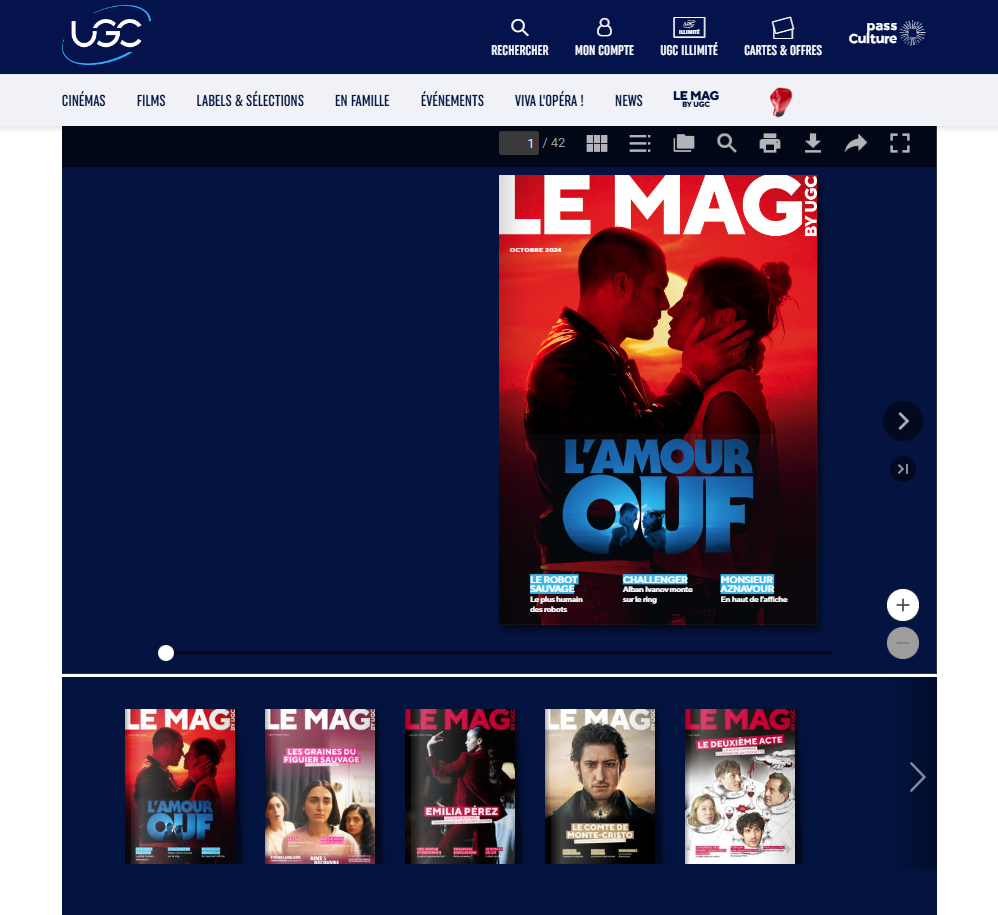
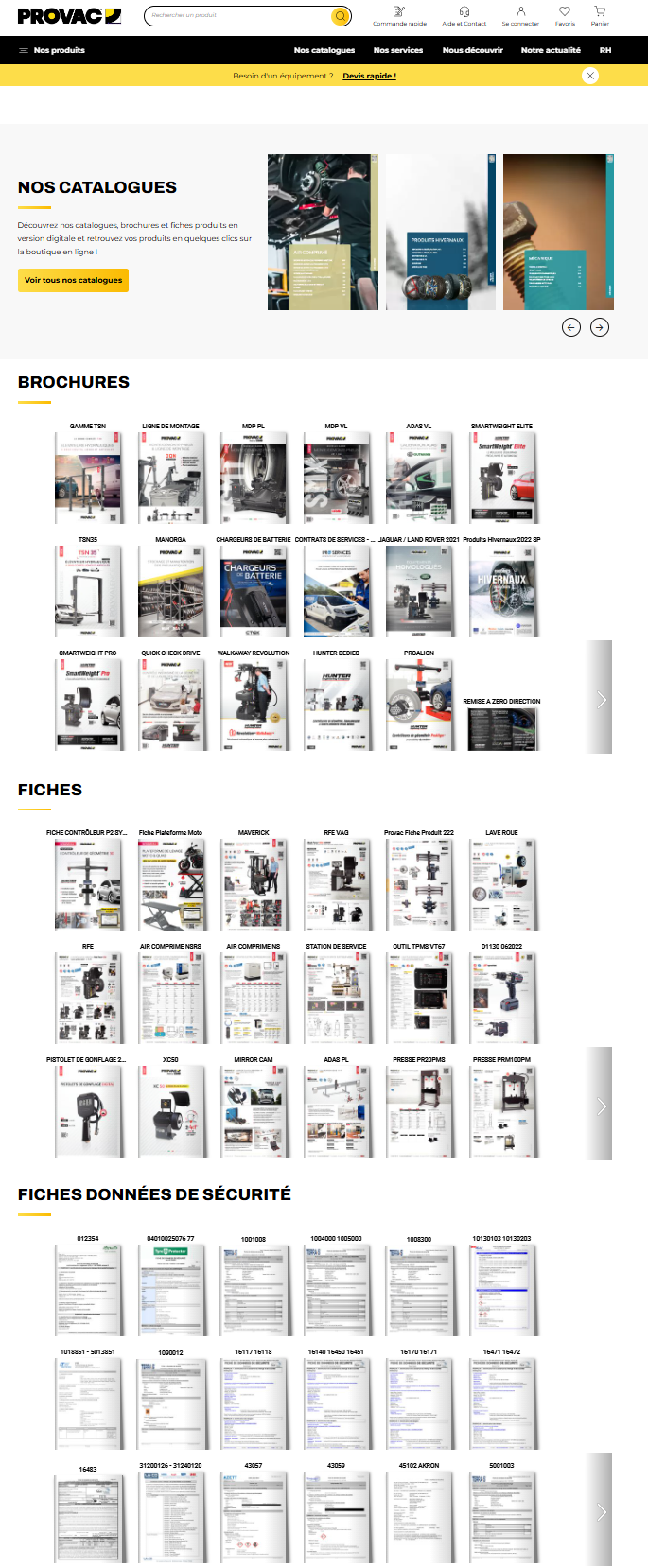
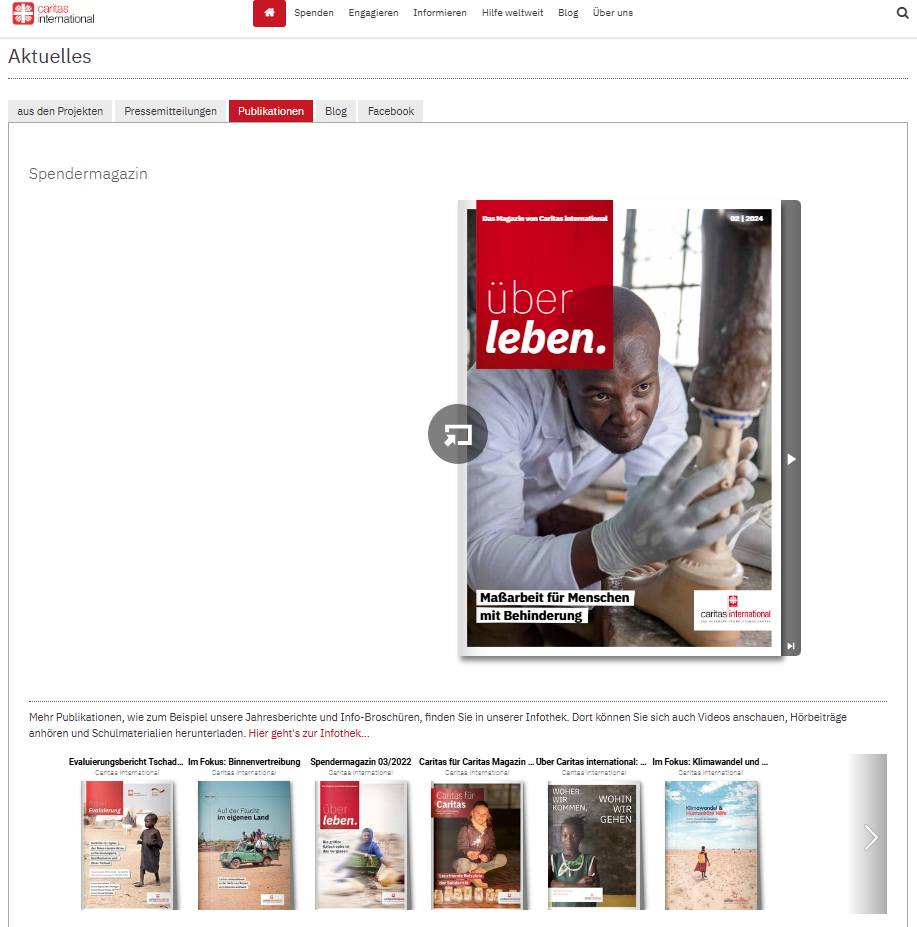
 NOTE: Private publications will not be displayed in the Library Widget, giving you total control over what is visible to your users.
 Request your