Publishing a beautiful digital publication with Calaméo is an essential first step. But once it’s online, the real challenge begins: getting it seen! Whether you’re sharing a magazine, catalog, or interactive brochure, attracting readers is key. The good news? A few best practices can go a long way in increasing the visibility of your content. Here are 3 simple and effective tips to help you boost the number of views on your Calaméo publications.
1. Polish your title and description
Think of your publication as a shop window. Its title and description should make people want to click.
A good title is clear, compelling, and includes relevant keywords. Avoid vague titles like “Summer Magazine”—they don’t say much and won’t stand out.
The description gives readers a quick preview of what to expect. Use this space to include strategic keywords and spark curiosity.
Getting more views isn’t just about the content itself, it’s also about how you present, embed, and share it. By applying these three tips, you’ll increase your chances of catching readers’ attention and giving your digital publications the visibility they deserve.
In today’s B2B landscape overflowing with content, offering just a basic PDF is no longer enough. To showcase your expertise, grab attention, and generate leads, you need to deliver an engaging reading experience. By combining interactivity, accessibility, and performance, Calaméo turns your white papers into powerful engagement tools, perfectly suited for modern digital distribution.
Turn your white papers into interactive experiences
A good white paper attracts. A great white paper engages.
With interactive publishing, you can transform static content into a truly immersive experience. On Calaméo, your white papers come to life with clickable links, embedded videos, animations, forms, and more—elements that capture attention, enhance navigation, and amplify your message.
More than just a PDF, your content becomes dynamic and accessible online from any device, with no downloads or barriers for your readers. The result? Greater visibility, higher engagement, and more conversions.
Why choose Calaméo?
Sharing a white paper isn’t just about emailing it or posting it on your blog. It’s about strategy, data, accessibility, and brand image. Here’s why professionals choose Calaméo:
A smooth, enjoyable reading experience: Your content adapts to all screen sizes with a premium layout.
Advanced sharing options: Direct links, website embeds, public or private reading—you stay in control.
Detailed analytics: Track views, reading time, and clicks to measure your campaign’s effectiveness.
Custom branding: Personalize the reading environment with your brand colors for a consistent, professional look.
Smart integrations: Add contact forms, and download links—everything you need to generate leads.
With Calaméo, your white papers become high-performing marketing assets, far beyond a simple read.
Conclusion
In an effective content strategy, the quality of your white paper matters just as much as its ability to reach and engage your audience. With Calaméo, you have a complete tool to share your content with maximum impact and professionalism.
Compared to printed material, digital communications have a lot of advantages. For one thing, they’re great if you want to go paperless. For another, it’s a lot easier to add a GIF to an online newsletter than to a piece of paper. But a truly revolutionary business advantage is the ability to track analytics for your digital publications.
Because analytics are so important, it can be intimidating to get started. If you’re wondering how to follow your Calaméo publications’ statistics, this is the guide for you! From the very basics to best practices, we’ll cover everything you need to know about analytics on Calaméo.
First of all, you might be wondering what exactly we mean by “analytics”. Although the word has been around a long time, it’s become much more popular since 2000. That’s because analytics specifically refers to examining and getting insights from data. Since the early 2000s, businesses have adopted digital technologies and enjoyed access to huge amounts of new data. Analytics help them understand and use that data.
As a result, analytics are increasingly important to all kinds of businesses. For Calaméo users, your online publications generate lots of great data. In this guide, we’ll show you how to find Calaméo analytics and the most valuable takeaways for your digital content.
How to use your Calaméo analytics
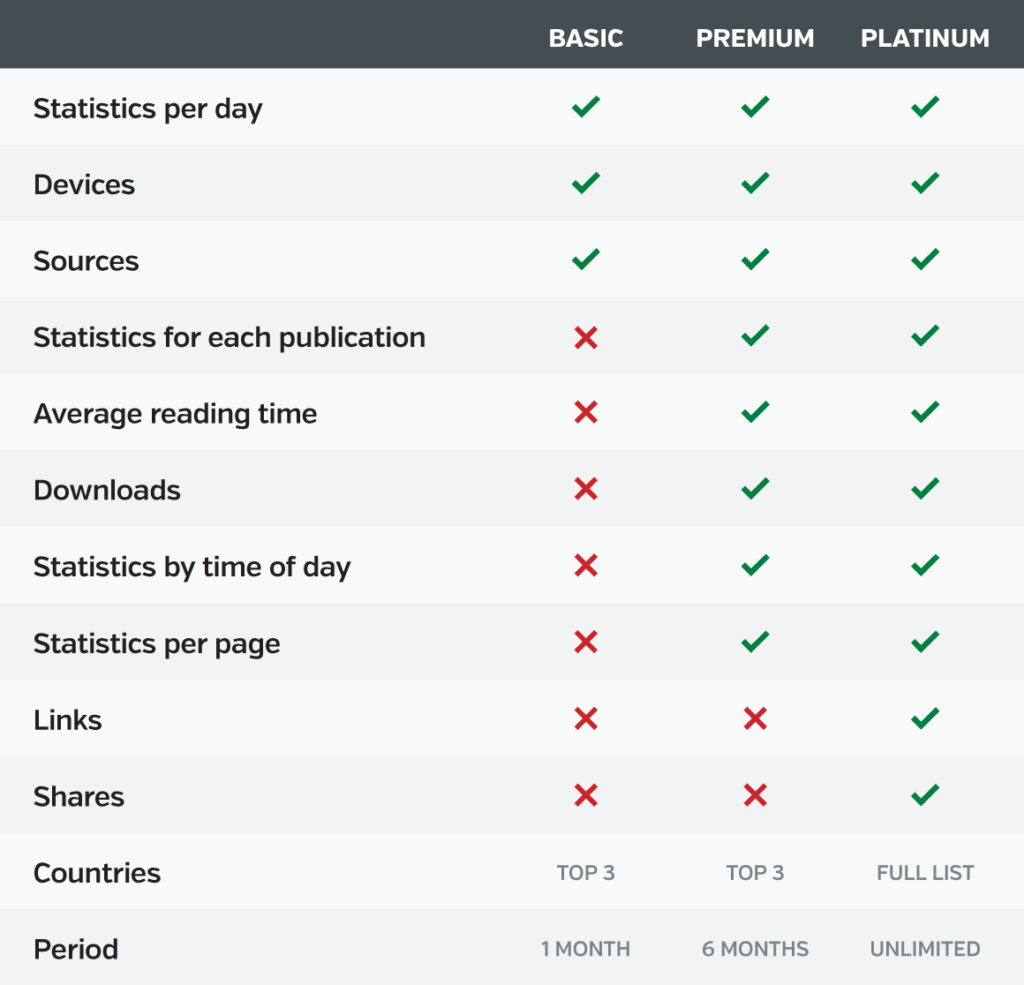
Good news: Viewership statistics are available for every Calaméo user. (Another reason why digital publishing on Calaméo is best in class!) However, the type of information that you can see will depend on whether your account is BASIC, PREMIUM or PLATINUM. Here’s a handy chart of available data for each plan:
Lifetime statistics
The easiest way to get to your publications’ analytics is by going to the Statistics tab in your Calaméo account. To start, make sure you are logged into your account. Next, display the top navigation bar. Click on the Statistics section.
In this section, you will find an overview of your account’s lifetime statistics. In other words, you can check the total number of views for all of your publications combined. Plus, you’ll see other interesting lifetime data in this section depending on your account type.
For all accounts, several features let you explore more about your publications’ viewership. Scroll down to:
Change the time period displayed
Drill down into key statistics like Clicks and Downloads
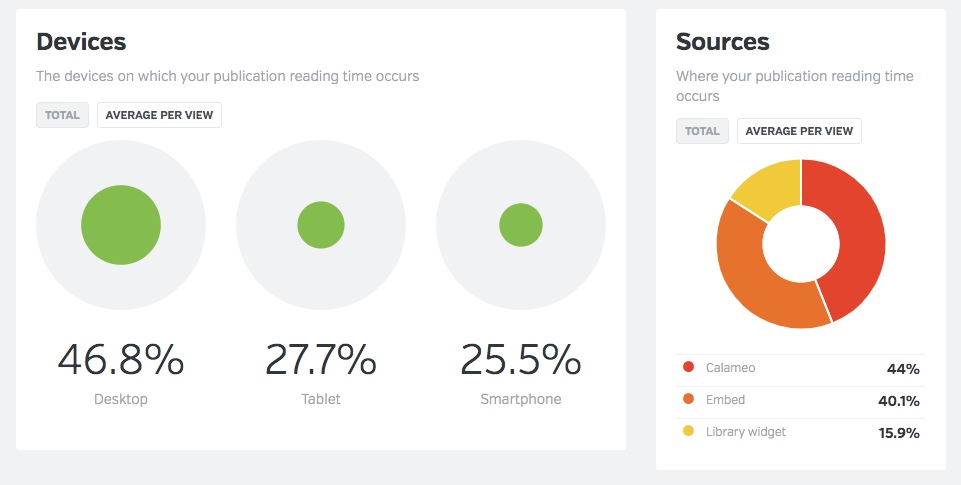
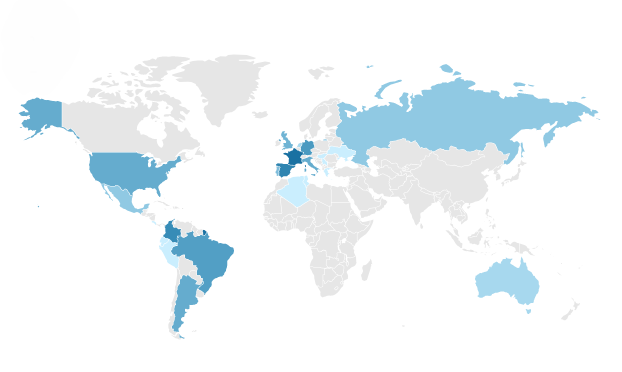
Discover other useful dimensions like Device, Source and Countries
Publication statistics
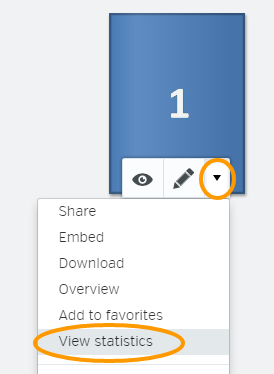
However, note that the Statistics tab provides info about all publications associated with your account. To track data for individual publications, you will need to go to the Publications tab of your account.
Find the publication you want to investigate and click the arrow. In the drop-down menu that opens, choose “View statistics”.
You can now explore the available data for just the selected publication.
Finally, PLATINUM users may connect their Calaméo accounts to Google Analytics. This powerful feature lets you integrate Calaméo data directly into your existing web analytics set-up.
💡 TIP: Want to see how using Calaméo with Google Analytics works for your business? Request your PLATINUM Demo today and test this exclusive feature for two weeks—absolutely free.
Identifying KPIs for your publications
After you’ve had a chance to explore your Calaméo statistics, it’s time to consider which analytics are the most important for your publications. Because the goal of analytics is to generate useful insights, deciding what information interests you is a major step. Or to put it another way, you’ll want to choose key performance indicators to follow.
Define business goals
To start, spend some time thinking about the main business goals associated with your online publications. Your specific goals will be unique, but here are a few common examples:
Growing awareness of your company, programs or services
Building a loyal audience for your brand and publications
Generating leads for your sales and marketing strategies
Increasing online revenue through your e-commerce operations
Different KPIs can help you measure progress on each one of these goals. For instance, publication views are a good indicator of awareness. On the other hand, the number of pages viewed and reading time better show your audience’s engagement. Download data may match how many leads came from a publication. And link clicks to your online store reveal what appeals to your shoppers.
Most of all, think about the information that matters to you. If you hope to expand your international reach, country data might be a top KPI to track.
Set KPIs and benchmarks
Select two to four KPIs for your publications, then gather the first set of data. This will give you a sense of where you are now in relation to your goals. Then, pick benchmarks for your KPIs to get a sense of where you want to be going. For example:
Awareness — 500 views / month
Leads — 25 downloads / month
International reach — 10% of views and downloads from Canada
Once you’ve finished identifying KPIs for your publications, take a look at our advice for ways to boost your results!
Tips to optimize performance
Since we began Calaméo all the way back in 2008, we’ve learned a thing or two about what works in digital publishing. Although there’s no guaranteed, easy trick for success, these simple tips are a good place to start.
Views
Beyond having great content, an unbeatable strategy for getting more views is to share your publications widely. Make it easy for your audience to discover your online publications! With Calaméo, you can:
Both of these analytics point to the level of engagement that viewers have with your publications. First, the number of page views tells you how much of your publication was opened per view. That is to say, did your audience view your publication past page one? Or all the way to the last page?
Next, reading time tells you how long audiences spent viewing your publication. Views with longer reading times and more page views suggest higher engagement than shorter reading times and fewer page views. And higher engagement means a bigger impact!
In recent years, offering content for download has become a key content marketing strategy. But even if you’re not focused on generating leads, direct downloads make for great user experience. When your audience gets to keep a copy of your publication, they can return to it anytime—even offline.
Here are a few effortless tips for boosting your results:
The click-through rate, or CTR, reveals how many viewers click the interactive links in your Calaméo publications. (More specifically, it calculates a percentage: the number of times a link was clicked divided by the number of times the relevant page was displayed.) Your advanced Calaméo statistics track the number of clicks and CTR for every link in your publications. Best of all? You can filter to focus on external, video, audio or Shopping links.
Although sharing to social media networks isn’t as big as it used to be, shares are still a good way to reach new audiences. That’s why our publication viewer includes a handy share button! But did you know that Calaméo’s PLATINUM statistics have detailed sharing data? See where, when and how your publications were shared from the viewer.
Now that you’ve gotten familiar with Calaméo’s analytics, chosen KPIs to track and optimized your publications, you can sit back and relax! To get started with analytics, most of the hard work happens at the beginning. However, there are a few important best practices to keep in mind for the future.
Be consistent.
Since you already know what information interests you, make sure you stay focused on consistent KPIs over time. Whether weekly, monthly or quarterly, collect the same stats on a regular schedule. Then, identify trends.
Be organized.
If you have access to limited statistics on Calaméo, you may wish to transfer your analytics to a separate document for tracking. Don’t misplace this data—analytics are especially useful to understand long-term trends.
Be flexible.
As time goes on, you might find that the KPIs you’re following are not connecting to your goals the way you expected. In that case, press pause and explore what isn’t working. You can rethink and adjust how you use analytics tools moving forward.
And there you have it—our complete guide to analytics on Calaméo! We hope you enjoy diving into insights and data about your digital publications. Have questions? You can write to us anytime at contact@calameo.com.

 Pro tip: On Calaméo, you can easily customize the title and description in your publication settings. Take the time to optimize them!
 Good to know: Embedded publications still count views on Calaméo!
 Discover the full potential of Calaméo—start your 14-day free PLATINUM trial today.
 Want to take it further?